
At the end of part eight, the goblins could chase you around the dungeon, but they couldn’t actually hurt you. The only damage you ever took was the five points I docked you for missing. When I came back to write this part, I found out that your sword wasn’t doing much to them either.
That turned out to be a bug in the code I published last time, so, yeah, this part starts with a big oops.
After that the goblins get their own attacks, you can now die, and of course the game asks if you want another go.
I added doors and keys, ran out of memory again, and had to move the whole screen to a different part of the C64’s memory to get it back.
Open the finished program and edit it in your browser here: part9c.bas in the RGC online IDE.
Each major chunk of changes is in the IDE if you want to follow along:
- part9a.bas fixes the combat bugs and moves the tiles onto characters you can type on a keyboard.
- part9b.bas adds doors and keys, places items and goblins properly, and moves the screen and character set to get more memory for BASIC.
- part9c.bas gives the goblins attacks of their own, and adds game over with a play again option.

The bug in part eight’s combat
Here’s the line from part eight that applied your damage to a goblin:
GH(GC)=GH(GC)-DMG
GH is the goblin health array, and the index should be G, the goblin you’re fighting. Oops, GC is the goblin count. So every hit you landed went to whichever goblin happened to be last in the list, wherever it was standing on the map. You could whittle down a goblin on the far side of the dungeon without ever going near it.
The second problem was when you walked into a goblin. That code set G=0 as a marker meaning “we don’t know which goblin this is”, and I said in part eight that we’d fix that “(yet)”. The death check only fired if G was bigger than zero, so the goblin you were actually hitting could never die from your blows.
Both are one-letter mistakes that make no noise. Nothing crashes and there’s no error message, the game just quietly does the wrong thing, which makes them the worst kind of bug to find in BASIC.
The fix is to find out which goblin is standing on the square you just tried to walk into. We already have their positions in GX and GY, so it’s a loop through the list:
FINDGOBBO:
REM WHICH LIVE GOBBO IS STANDING ON PX/PY? 0 = NONE
G=0
FOR N=1 TO GC
IF GX(N)=PX AND GY(N)=PY AND GH(N)>0 THEN G=N
NEXT N
RETURN
The GH(N)>0 test is important because dead goblins keep their coordinates. Without it, a dead goblin’s old square would still count as occupied, and you could end up “fighting” a corpse.
The collision handler now calls that before combat, and bounces you back to where you were standing:
IF CH=38 THEN GOSUB FINDGOBBO:GOSUB COMBAT:PY=OY:PX=OX:GOSUB SHOWHUD:RETURN
With G set to a real goblin, combat can damage the right one:
REM DAMAGE THE GOBBO WE ARE FIGHTING (G), NOT THE LAST ONE IN THE LIST (GC)
GH(G)=GH(G)-DMG
IF GH(G)<=0 THEN MSG$="GOBBO DEAD":GOSUB ERASEENEMY:GOSUB ALERT

You can now follow the tutorials and edit the code right in your web browser with the Online Retro IDE
– No downloads, configuration, etc necessary, and it is free!
Tiles you can type in
The character set got an overhaul in this part too. The dungeon tiles used to be in the shifted graphics block, screen codes 64 to 127. You can reach those with SHIFT on a real C64, but you can’t type them as plain text in the web IDE, and they turn into gibberish when you copy a listing into anything else.
My first idea was to put the items on letters nobody would miss, like H for a heart, I for the idol and K for a key. That lasted until I looked at the HUD, which spells out HEALTH and KEYS. Every H became a little heart and every K became a key.
So every tile is on a punctuation character now, and that works because of a handy quirk of the C64. For the characters from 32 to 63 (space, punctuation and the digits), the PETSCII code you type and the screen code that ends up in video memory are the same number. So a wall is a # in the listing, it’s 35 when you PEEK the screen, and 35 is also its ASCII code. You don’t need a lookup table in your head.
Letters don’t work that way, and that’s the trap. K is PETSCII 75 when you type it, but its screen code is 11, so IF CH=75 will never match a K on the screen.
Here’s the full list, which is also at the top of the listing:
| Tile | Character | Screen code |
|---|---|---|
| Player | @ | 0 |
| Wall | # | 35 |
| Floor | . | 46 |
| Door | ? | 63 |
| Cracked door | ‘ | 39 |
| Goblin | & | 38 |
| Rat | ) | 41 |
| Sword | / | 47 |
| Jewel | $ | 36 |
| Key | % | 37 |
| Heart | + | 43 |
| Potion | * | 42 |
| Chalice | ( | 40 |
| Shield | [ | 27 |
| Stairs up and down | < and > | 60 and 62 |
Proper roguelikes use + for a door, but I wanted + for the heart, so doors went on ?. If you want to see the whole character set at once, run chars9viewer.bas in the IDE.
There’s a catch that got me later in this part, and it’ll get you too. Every ? and / you PRINT is now a door or a sword. More on that when we get to the game over screen.
Doors and keys
A dungeon needs doors, and a door needs a key. I wanted two ways through, though, because it’s more fun when you have to choose. If you have a key, the door unlocks. If you don’t, you can shoulder it open, which costs you some health. The first shove cracks it (the door turns into a ') and the second shove breaks it.
DOOR:
REM TAKETILE LEAVES BK=1, SO THE DOOR OPENS NOW
REM AND WE STEP THROUGH ON THE NEXT MOVE.
IF KY>0 THEN KY=KY-1:MSG$="UNLOCKED":GOSUB TAKETILE:RETURN

REM NO KEY - SHOULDER IT AND TAKE THE BRUISE
HP=HP-2
MSG$="DOOR BASHED -2"
GOSUB ALERT
ROW=PY : COL=PX : GOSUB CURSORSET : PRINT "{BROWN}'";
RETURN
Keys used to be worth ten gold, like everything else you picked up. Now you keep them. KY counts how many you’re carrying, and the HUD has a new column for it. The HUD uses the heart, jewel and key tiles as its labels, which saves screen space and looks much more like a game.
Cracking the door open is a single PRINT. We move the cursor onto the door and print the cracked door character over it. The next time you walk into it, the collision code reads screen code 39 instead of 63 and runs DOORCRACKED, which breaks the door for good.
Now we still need to show doors where they make logical sense but one step at a time.
Goblin no-shows
Part eight had a problem I only put on the to-do list. Goblins, and anything else you could pick up, were baked into the map tiles. Tile 17 was a room with a goblin in the middle, so the number of goblins depended on how many times the random map happened to pick tile 17. Some maps had none, and some had so many they hit the ten-goblin limit.
Doors made that unacceptable. If a door appears on a map and no key does, the player is stuck, and that’s the game’s fault, not theirs.
So the tiles are only corridors and rooms now, and a new routine called POPULATE decides what goes in them afterwards:
POPULATE:
GC=0
NG=INT(RND(1)*4)+3
IF NG>10 THEN NG=10
IT$="{GREEN}&"
FOR N=1 TO NG
GOSUB PLACEONE
IF PF=1 THEN GC=GC+1 : GX(GC)=CX : GY(GC)=CY : GH(GC)=10
NEXT N

REM EVERY DOOR GETS A KEY, SO A LEVEL IS ALWAYS WINNABLE
ND=INT(RND(1)*3)+1
IT$="{BROWN}?" : FOR N=1 TO ND : GOSUB PLACEONE : NEXT N
IT$="{ORANGE}%" : FOR N=1 TO ND : GOSUB PLACEONE : NEXT N
(I’ve trimmed the REMs and the hearts, potions and treasure, which work the same way.)
Now it’s a decision instead of luck. Three to six goblins, one to three doors, and the same number of keys as doors. There are always two hearts to heal with, and the sword and jewels finally turn up on the map, because the old tiles never included them.
PLACEONE does the actual placing. It picks random squares until it finds floor:
PLACEONE:
PF=0 : TR=0
PLACETRY:
TR=TR+1 : IF TR>200 THEN RETURN
CX=INT(RND(1)*21)+1 : CY=INT(RND(1)*21)+3
IF PEEK(SA+LUT(CY)+CX)<>46 THEN GOTO PLACETRY
IF CX=PX AND CY=PY THEN GOTO PLACETRY
ROW=CY : COL=CX : GOSUB CURSORSET : PRINT IT$;
PF=1
RETURN
This uses the same PEEK trick as the collision code: if the square holds screen code 46, it’s empty floor. The TR counter is the safety net. On a map that’s mostly walls, “keep trying until you find floor” could run for a very long time, and if there were no floor left it would never finish. After 200 tries it gives up and sets PF to 0 so POPULATE knows not to add a goblin that was never drawn.
Out of memory, again
The doors took us over the memory limit. I added the door code, pressed RUN, and got ?OUT OF MEMORY ERROR straight away on the CLR line, before the game had even started.
Last time we moved a 2K character set to 14336 and told BASIC to stop there. That gave BASIC everything from 2049 to 14335, which is about 12K. Part 9a had used all but 642 bytes of it, so the doors were always going to be too much.
The VIC-II can only see 16K of memory at a time, and it was looking at the bottom 16K. That’s why the character set had to fit underneath 16384, and BASIC had to fit underneath the character set.
But the VIC can look at any of the four 16K banks. Bank 1 runs from 16384 to 32767, and it’s all plain RAM. So we put the screen and the character set at the top of bank 1, and BASIC gets everything below them.
| Address | Part 9A | Part 9B |
|---|---|---|
| 1024 | screen | free for BASIC |
| 2049 up | BASIC program, variables, arrays | BASIC program, variables, arrays |
| 14336 | character set, BASIC stops here | free for BASIC |
| 29696 | screen, BASIC stops here | |
| 30720 | character set | |
| 32767 | end of VIC bank 1 |
That takes BASIC from about 12K to about 27K, which should last us a good while.
It takes four changes. The first is picking the bank, which is set in bits 0 and 1 of address 56576. That’s on one of the CIA chips, not on the VIC:
REM VIC BANK 1. THE TWO BITS ARE INVERTED, SO
REM 3=BANK0 2=BANK1 1=BANK2 0=BANK3.
POKE 56576,(PEEK(56576)AND252)OR2
It’s the same read, mask and replace pattern as part eight, because the other six bits of that register do other jobs. AND 252 clears the bottom two bits, and OR 2 sets the value we want. The bits are inverted, so 2 means bank 1, not bank 2. I have no idea why Commodore wired it that way, but it’s been catching people out since 1982.
The second change is register 53272, which we’ve met before. The top four bits give the screen’s position and the bottom four give the character set’s, both counted from the start of the bank. This time we’re setting both, so there’s nothing to preserve and we can POKE the number directly:
REM 13*16 + 7*2 = 222 -> SCREEN $7400 CHARSET $7800
POKE 53272,222
The screen moves in 1K steps, so 13 is 13 x 1024 = 13312 into the bank, and 16384 + 13312 = 29696. The character set moves in 2K steps, and it’s the doubled value again like last time: 14 means 7 x 2048 = 14336 into the bank, which puts it at 30720.
The third change is easy to miss. The VIC now shows the screen at 29696, but the KERNAL, the part of the ROM that handles PRINT, still thinks the screen is at 1024. It would carry on printing text into memory nobody is looking at. Location 648 tells it where the screen is, in 256 byte pages:
POKE 648,116
116 x 256 = 29696. PRINT, the cursor positioning routine and the screen PEEKs all follow along, apart from one thing. The SA variable, which holds the screen address for our collision PEEKs, has to change from 1024 to 29696 too.
The fourth change is the familiar one. We move BASIC’s ceiling down so it stops at the screen:
IF PEEK(2)<>73 THEN POKE 55,0:POKE 56,116:POKE 2,73:CLR
It’s the same line as in part eight, with 116 instead of 56.
Bank 1 has one catch. In banks 0 and 2, the VIC sees a copy of the character ROM, which is where the standard letters come from. Banks 1 and 3 don’t have that copy. So in bank 1 there’s no built-in font to fall back on, and our character set has to contain every letter and digit as well as the tiles. Ours already did, but if you try this with a character set that only replaces a few characters, all your text will turn to garbage.
The file is now chars9b.bin. It’s the same character set as chars9.bin, except that the two-byte load address at the start of the file says 30720, not 14336, so LOAD "CHARS9B.BIN",8,1 puts it in the right place.
A labels bug
This one only affects you if you use labels. Part 9a had the label HOLDFORKEY twice, once in the change keys screen and once at the end of the character generator. I’d copied the wait-for-a-key loop from one place to the other and forgotten to rename it.
The IDE converts labels into line numbers when it tokenises the program. When a label appears twice, the later one silently wins, with no warning. So the Y or N question at the end of the change keys screen jumped into the character generator’s wait loop, whose RETURN sent it somewhere completely different. Pressing N never let you redo your keys.
The labels are now CONFIRMKEYS and PRESSTOPLAY, and if a GOTO ever lands somewhere impossible in your own code, search for the label to check there’s only one.
Goblin attacks
Now for the main event. Goblins nowmake their own attack rolls.
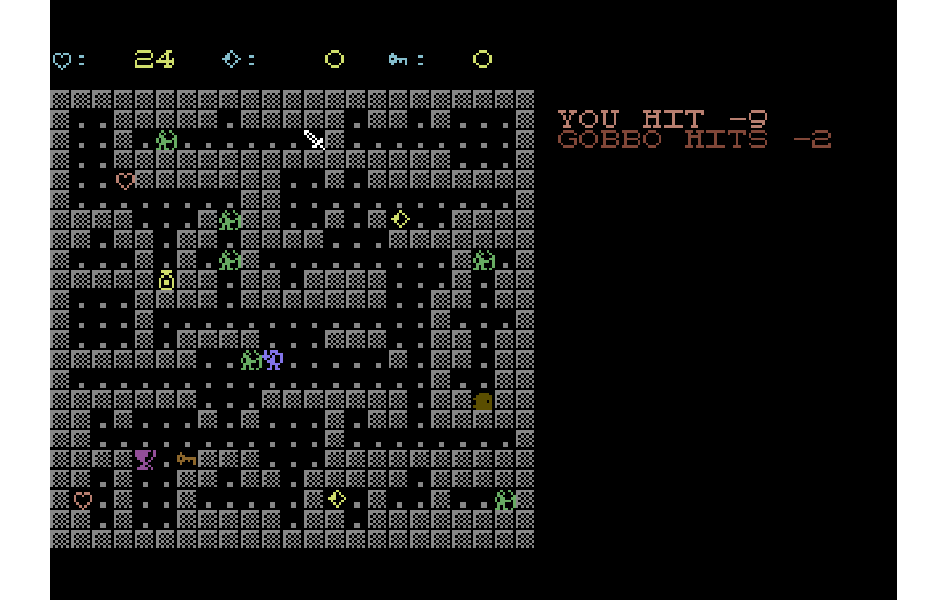
Tabletop D&D uses one rule for both sides. You roll a d20, add your modifier, and if the total meets or beats the target’s Armour Class, you hit. So the player needs an AC, and like the strength modifier from last time, it comes out of the stats we rolled at the start. Dexterity gets you out of the way, so AC is 10 plus the dexterity modifier:
REM ARMOUR CLASS: 10 PLUS DEXTERITY MODIFIER
AC=10+INT((STATS(1)-10)/2)
That goes in INITPLAYER, so it’s worked out once per character rather than every time a goblin swings.
Last time, the goblins could already tell when they were next to you, because that’s when the fight started. So that line in ENEMYLOGIC stays. It just calls the goblin’s attack now, not yours:
REM NEXT TO YOU? THEN IT SWINGS
IF ABS(GX(G)-PX)<=1 AND ABS(GY(G)-PY)<=1 THEN GOSUB GOBBOATTACK
And here’s the attack:
GOBBOATTACK:
GOSUB LOGLINE

REM D20 PLUS 3, MEET OR BEAT YOUR AC TO HIT
RL=INT(RND(1)*20)+1+3
IF AC>RL THEN PRINT "{GREEN}GOBBO MISSES";:RETURN

REM D6 DAMAGE. MID$ DROPS THE SPACE STR$ ADDS
DG=INT(RND(1)*6)+1
HP=HP-DG
PRINT "{RED}GOBBO HITS -";MID$(STR$(DG),2);
RETURN
The goblin gets +3 to hit and does a d6 of damage. The miss test reads backwards on purpose. If your AC is bigger than the goblin’s roll, it has failed to meet or beat it, so it misses. With an average dexterity your AC is 10 or 11, so a goblin hits you a bit more than half the time, for three or four points. You start with twice your constitution in health, usually 20-something, so one goblin is a nuisance and three at once are a real problem. Those two numbers, the +3 and the 6, set how hard the game is. Change them and see what happens.
I also switched your own attacks to meet or beat, changing IF D20<=8 to IF D20<8, so both sides play by the same rule.
One log for everything
Messages were the next problem. Everything so far went through ALERT, which printed on the top line of the screen, but now there can be several things to report in one turn. You swing, then maybe three goblins swing back. If they all used the top line, you’d only ever see the last one.
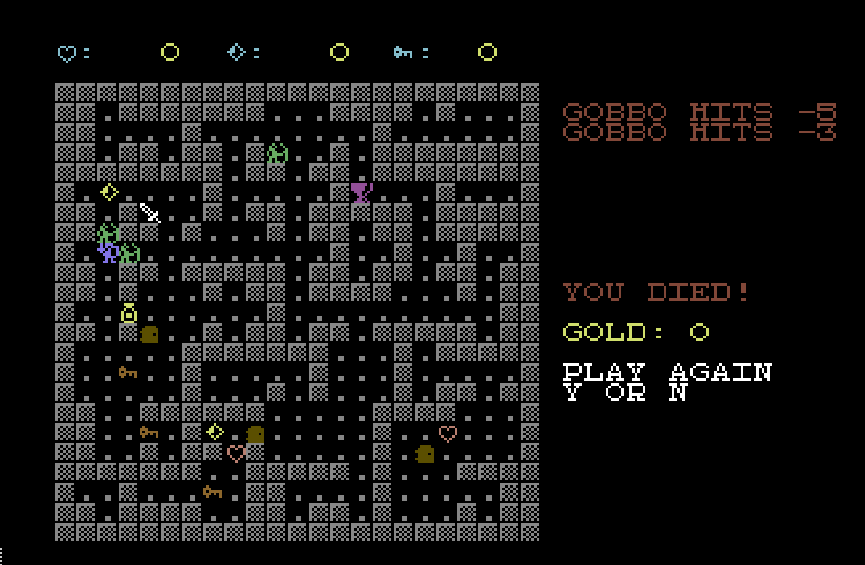
There was a whole empty area of screen to the right of the map, though. The map is 23 characters wide, so from column 24 there are 16 columns doing nothing. So that’s where every message goes now, yours and the goblins’, one line each, in the order things happen. A busy turn reads top to bottom like a little story:
YOU HIT -5
GOBBO DEAD
GOBBO HITS -3
GOBBO MISSES
LOGLINE hands out the next free line. LA counts how many lines this turn has used:
LOGLINE:
REM NEXT FREE LOG LINE, RIGHT OF THE MAP. PAST
REM 9 LINES WE REUSE THE LAST ONE RATHER THAN
REM RUN INTO THE GAME OVER PANEL AT ROW 12
IF LA<9 THEN LA=LA+1
ROW=2+LA : COL=24 : GOSUB CURSORSET
RETURN
The goblin attack calls it directly, because it picks its own colour for a hit or a miss. Everything else still calls ALERT, which now just asks for a log line and prints the message there:
ALERT:
REM YOUR MESSAGES GO IN THE LOG TOO. 15 CHARS
REM FITS THE 16 COLUMNS RIGHT OF THE MAP
GOSUB LOGLINE
PRINT "{PINK}";LEFT$(MSG$,15);
RETURN
That’s the nice thing about having routed every message through one subroutine back in part seven. Combat, doors and item pickups all call ALERT already, so they all moved into the log without touching a single one of those lines. The only change they needed was shorter wording. “HIT GOBBO WITH 5 DAMAGE!” doesn’t fit in 15 characters, so it’s “YOU HIT -5” now, and “YOU BASH THE DOOR!” became “DOOR BASHED -2”.
While I was shortening them, I made the pickups say what you actually got, so a jewel reads “JEWEL 10 GOLD” and a sword “STRENGTH UP 2”. The heart was going to be “HEALTH +4” until I remembered that + is the heart. It says “HEALED 4” instead, and the leading space STR$ adds to a positive number is, for once, exactly what we want.
With the top line gone, the HUD moved up to take its place. That’s a one-character change to MV$, the string SHOWHUD prints before the HUD to position the cursor. It was HOME, DOWN, CYAN, and now it’s just HOME and CYAN.
The log clears at the start of each turn, as soon as you press a key, so your action and the goblins’ replies stay on screen together until your next move:
CLEARLOG:
FOR N=1 TO LA
ROW=2+N : COL=24 : GOSUB CURSORSET
PRINT "               ";
NEXT N
LA=0
RETURN
It only clears as many lines as were used, and only if any were used (IF LA>0 THEN GOSUB CLEARLOG in KEYS, straight after the GET). Moving the cursor goes through a KERNAL call, which is slow in BASIC, so it’s worth skipping on the many turns when nothing happens.
The MID$ in GOBBOATTACK is the fix I mentioned in part eight for the leading space that STR$ adds. Without it you’d get “GOBBO HITS – 4”.
Damage that heals
Shortening the combat message turned up one more bug from part eight. Your damage is a d8 plus your strength modifier. Roll a weak character, say strength 5, and the modifier is -3. A d8 roll of 1 or 2 then gives -2 or -1 damage, and subtracting a negative number from the goblin’s health adds to it. You’d be healing it. So damage has a floor now:
IF DMG<1 THEN DMG=1
MSG$="YOU HIT -"+MID$(STR$(DMG),2):GOSUB ALERT
Stop reseeding the dice
Part eight’s combat started every roll with R=RND(-TI), reseeding the random number generator from the clock. I explained it was there so you didn’t get the same rolls every game. Reseeding does do that, but only once is needed, and the character generator already does it before anything else rolls.
Reseeding before every roll is a problem now that several dice can be rolled in one turn. TI only ticks 60 times a second. If two rolls happen within the same sixtieth of a second, they get the same seed, and they come out the same. So that line has gone from COMBAT, and the goblin attack never had it in the first place.
Sorry, you died
Death finally means something. The check goes in the spot we left for it in the game loop back in part eight:
REM CHECK GAME OVER CONDITIONS HERE
REM --------------------------------
IF HP<=0 THEN GOTO GAMEOVER
It runs after the goblins have had their turn, so the check comes once, after all the damage for that turn, rather than halfway through a goblin’s attack. Bashing a door also costs health, so you can knock yourself out on a door, and this check catches that as well.
It’s a GOTO, not a GOSUB, and that’s deliberate. A GOSUB leaves a return address on the stack. If we GOSUBbed into the game over screen and then jumped from there into a fresh game, that return address would never be used. Die enough times and they’d pile up until BASIC ran out of stack space, which is the same trap as jumping out of a FOR loop in part eight. The main loop is the top level of the program, and nothing is waiting to be returned to, so a GOTO in and a GOTO out leaves nothing behind.
GAMEOVER:
REM GOTO NOT GOSUB, SO NOTHING IS LEFT ON THE STACK
HP=0 : GOSUB SHOWHUD
ROW=12 : COL=24 : GOSUB CURSORSET : PRINT "{RED}YOU DIED!";
ROW=14 : COL=24 : GOSUB CURSORSET : PRINT "{YELLOW}GOLD:";GL;
REM NO ? OR / HERE - IN OUR FONT THOSE ARE A DOOR AND A SWORD
ROW=16 : COL=24 : GOSUB CURSORSET : PRINT "{WHITE}PLAY AGAIN";
ROW=17 : COL=24 : GOSUB CURSORSET : PRINT "Y OR N";
HP=0 is cosmetic. A goblin hit can take you to -3, and “YOU DIED” next to a negative health figure looks like a bug even though it isn’t.
Remember the catch from the tiles section? My first go at this said PLAY AGAIN? Y/N, and on screen it came out as PLAY AGAIN followed by a door, then Y, a sword and N. The ? and / are tiles now, and they will be in every message from here on. The key setup screen had the same problem, so “HAPPY WITH YOUR CHOICES?” is now “HAPPY WITH THESE KEYS, Y OR N”.
Then we wait for an answer:
PLAYAGAIN:
GET A$ : IF A$="" THEN GOTO PLAYAGAIN
IF A$="Y" THEN LA=0 : GOTO DRAWMAP
IF A$<>"N" THEN GOTO PLAYAGAIN
It’s the GET loop from the key redefinition, with one difference. Anything that isn’t Y or N goes back round the loop. The player might still be holding a movement key when they die, and you don’t want a leftover P to count as “no”.
Y goes back to DRAWMAP, which rolls a new character, a new map and new goblins. INITONCE doesn’t run again, because the FL flag is still set and the arrays are already DIMmed. DIMming the same array a second time gives you ?REDIM'D ARRAY ERROR. LA goes back to zero so the new game’s first turn doesn’t try to clear log lines from the last one.
Tidying up when you quit
If you press N, the game ends, but we moved a lot of things to get here. The VIC is looking at bank 1, the KERNAL is printing to 29696, and the font is ours. If we just ENDed, you’d drop out to a READY prompt in the dungeon font, and LIST would show you a program where every ? is a door.
So the game puts it all back first:
POKE 56576,(PEEK(56576)AND252)OR3
POKE 53272,21
POKE 648,4
POKE 53280,14 : POKE 53281,6
PRINT "{CLR}{LIGHTBLUE}THANKS FOR PLAYING!"
END
Bank 0, the screen back at 1024 with the ROM font (21 is the value the C64 powers up with), the KERNAL told the screen is at page 4 again, and the familiar light blue on blue. It’s the same four changes as the bank switch, done in reverse. BASIC’s lowered ceiling stays where it is, which does no harm until you switch off.
[YOU: screenshot of the game over panel, and maybe the goblin attack log]
What’s next
The to-do list has got shorter, and for the first time this is a game you can lose. The next thing is to make it a game you can win.
- A way to win. There’s a chalice on every map now. Picking it up should probably end the level.
- More than one kind of enemy. The rat already has a tile,
), and no code. It’s a good excuse for a different movement pattern than “walk straight at the player”. - The shield. It also has a tile and no code, and now that goblins roll against your AC, a shield that adds to it is an easy win.
- Fog of war, so you don’t see the whole dungeon on turn one.
- Stairs and levels.
<and>are in the character set, waiting. - A speed lesson. A turn takes about two thirds of a second, and I timed where it goes. Most of it isn’t the goblins’ thinking, it’s BASIC hunting through the program for each GOSUB, and moving the cursor to print one character at a time. There’s a whole part in making that faster.
- Doors that make sense. POPULATE drops doors on any empty floor, so they look like something to pick up. A door belongs across a corridor, where it actually blocks the way. The map already knows where those are: every horizontal or vertical corridor tile has a middle square with wall on both sides. So MAPROLL can note those squares as it draws, and POPULATE can pick its doors from that list, keeping the guaranteed number of doors and keys.
All three versions are in the IDE if you want to poke at them: part9a.bas, part9b.bas and part9c.bas. Try giving the goblins +5 to hit, or a d8, and see how long you last. If you make something nastier, I’d love to see it!
 Worth a Watch issue 02