
The C64 Dungeon is nearly finished! Today we need to add increasing level difficulty, introduce a new enemy type, and give the player a magic-assisted range attack …
View and play part12b.bas in the RGC online IDE.

The story so far
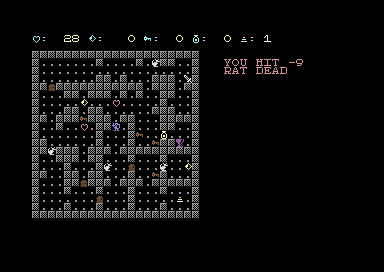
Previously (in part eleven), we introduced level progression and your character now retains and boosts stats between dungeons, but every level stuck to the same 3 to 6 goblins so as your character grows in abilities, the challenge actually got easier rather than more difficult!
Confused about LABEL: and GOSUB without line numbers? Remember, the RGC IDE allows labels for gosub/goto, these are translated to line numbers when ‘tokenised’ – the result does work on a real Commodore 64! Download the .prg and try it!
Of course I always intended to add more enemies. I showed the rat ) and the shield [ in the character set back in part nine, but they sat dormant as they had no code.
We also introduced collectible magic, it was even counted on the status line, but again nothing used it.
So those are the “burning” issues for today. Implement increased difficulty, and shooting fireballs!

You can now follow the tutorials and edit the code right in your web browser with the Online Retro IDE
– No downloads, configuration, etc necessary, and it is free!
Creating Enemy Types
Due to the way the C64 treats variable names, I will stick with the goblin arrays and naming convention, but I added one more, GT, which is the type of each enemy. 1 is a rat, 2 is a goblin.
A second set of arrays for rats would mean a second copy of the movement loop, the attack code and the “what is on this cell” search. One list with a type column keeps one copy of each.
Yeah, a rat is a … goblin type of 1 … hmmm. Goon? Yeah. Goon Type. Meant to do it!
What makes a rat a rat is detailed in six small arrays indexed by type:
EN$(1)="RAT" : EG$(1)="{GREY3})"
EH(1)=4 : EA(1)=6 : EB(1)=1 : ED(1)=3
EN$(2)="GOBBO" : EG$(2)="{GREEN}&"
EH(2)=10 : EA(2)=8 : EB(2)=3 : ED(2)=6
| Array | Rat | Goblin | |
|---|---|---|---|
| Name in messages | EN$ | RAT | GOBBO |
| Hit points | EH | 4 | 10 |
| Armour class (player must roll this or more) | EA | 6 | 8 |
| Bonus on its own to-hit roll | EB | 1 | 3 |
| Damage die | ED | 1 to 3 | 1 to 6 |
EG$ is the colour and character to draw.
Think of this data as the goon’s character sheet. A rat is easier to hit, hits less often, and does less damage.
In the industry we might call it data-driven programming in that this table-driven code asks the table what to do, and adding a new kind of enemy means a new row of numbers, with no new IF lines to slow down the combat code.
My code that used to have magic numbers in it now looks the values up instead. Our goblin’s armour class of 8 became EA(GT(G)), and “GOBBO DEAD” became EN$(GT(G))+" DEAD".
GT(G) inside the brackets is one array used as the index into another so we find this enemy’s type, then find that type’s value.
Rat Movement Logic and Enemy “AI”
What about enemy “AI”? Each enemy needs, if not “AI”, at least a movement pattern. A goblin moves toward the player. For the rat I chose for it to move at random.
IF E=1 THEN IX=IX+INT(RND(1)*3)-1 : IY=IY+INT(RND(1)*3)-1 : GOTO ENEMYSTEP
INT(RND(1)*3) is 0, 1 or 2. Taking 1 off gives -1, 0 or 1: one step back, stay, or one step on. Done once for X (across) and once for Y (down), that is nine possible moves if you include standing still.
The move still has to point to a floor tile, the same check the goblins use, so rats bump into walls rather than skitter through them. By optionally removing that check we could have ghosts almost for free.
A rat when positioned next to the player attacks with a bite, using the same attack code as the goblin but pulling its own numbers from the lookup table.
Rats also follow the sleeping rule from part ten so a rat outside the player’s zone does not take a turn until it is stepped on or attacked, waking it up.
Difficulty in numbers, a table for levels
We now also have a table for levels. Each level currently looks up four numbers covering rats, goblins, extra goblin hit points, extra goblin to-hit. This is not set in stone, for example instead of buffing the gobbos as levels increase we could instead have a super-gobbo goon type. Right now this is just an option for testing.
DATA 4,0,0,0
DATA 3,2,0,0
DATA 2,4,0,0
DATA 2,5,4,1
DATA 0,7,8,2
| Level | Rats | Goblins | Goblin hit points | Goblin to-hit bonus |
|---|---|---|---|---|
| 1 | 4 | 0 | ||
| 2 | 3 | 2 | 10 | 3 |
| 3 | 2 | 4 | 10 | 3 |
| 4 | 2 | 5 | 14 | 4 |
| 5 | 0 | 7 | 18 | 5 |
DATA lines hold numbers inside the program. READ takes them in order, one for each variable named, and remembers where it got to.
DIM LR(5),LG(5),LH(5),LB(5)
FOR N=1 TO 5 : READ LR(N),LG(N),LH(N),LB(N) : NEXT N
Each line of DATA is one level, which makes the difficulty balance something I can skim and tweak just by editing numbers.
The table is read once, when the game first starts, into four arrays. LR(LV) is then “rats on this level”.
POPULATE calls one new routine twice, once for each type:
E=1 : NG=LR(LV) : GOSUB SPAWN
E=2 : NG=LG(LV) : GOSUB SPAWN
SPAWN places NG enemies of type E, and gives goblins their extra hit points for the level.
The most enemies on any level is seven but the arrays have room for ten.
New Pickup: Shields
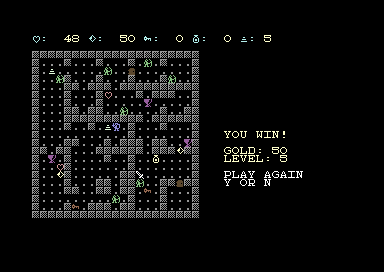
Increasing the difficulty offers an opportunity for the player to also get stronger. Adding a shield offers the player the chance to increase their armour class, IE. the number an enemy’s roll has to match or beat.
A shield is only placed on even levels, currently that means levels 2 and 4.
IF (LV AND 1)=0 THEN IT$="{CYAN}[" : GOSUB PLACEONE
LV AND 1 is 0 for an even level, the same odd-or-even test I used for levelling up in part eleven.
The shield bonus is also kept in its own variable, SB. Levelling up works armour class out again from dexterity, and without SB that sum would ignore the shield.
AC=10+INT((STATS(1)-10)/2)+SB
Level 5 goblins roll a twenty-sided die plus 5. Two shields are worth 4 of that.
Attacking with Magic
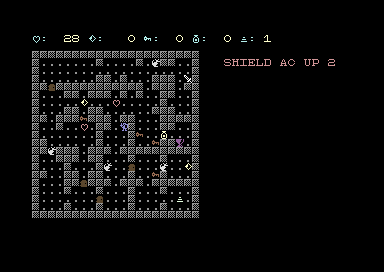
We have had “SPACE to fire” in the instructions basically from the start. Now we need to implement it.
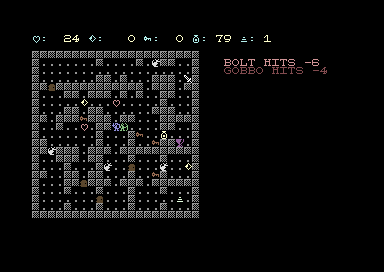
Pressing space shoots a fireball in the direction you are pointing based on your last move.
It costs 5 magic to cast and 1 more for every cell it crosses so longer distances cost more magic. With less than 6 magic the log will report “NO MAGIC” and nothing happens.
Your fireball can cross over floor but is absorbed by walls, doors, and objects, though perhaps we should allow the player to shoot doors? Shooting an enemy does 5 to 10 damage and wakes it.
A potion provides 50 magic. A shot across a three-cell room costs 8, so one potion is about six shots.
You might recognise the rules from the C version of this game. The C version has to add a pause after drawing each step or the bolt is too fast to see. BASIC being slower needs no delays!
Where are you looking?
Two variables, LX and LY, hold the last direction moved: -1, 0 or 1 for across, and the same for down. Each movement key sets them as well as moving.
IF P$=OKEY$ THEN PX=PX-1 : LX=-1 : LY=0
They are set even when the move is blocked, so walking into a wall turns the player to face it.
The bolt’s position each step is the last position plus LX and LY. That means our loop serves all four directions without requiring an IF to slow it down.
Drawing the fireball with POKE
The fireball is not a new graphic, instead I use the floor dot character that is already on the screen, but the colour changes to yellow for a moment.
It works because the fireball only ever crosses floor. Nothing has to be drawn or erased, and nothing has to be restored, only recoloured through the screen colour memory.
For displaying multiple characters, PRINT wins by a lot, but for one cell change, POKE wins.
POKE puts a number into a memory address. The screen is 1000 addresses, one for each character cell, holding the screen code of the character shown there.
Colour is a second block of 1000 addresses the same shape as the screen, holding a colour number for each cell. Changing a cell’s colour needs no knowledge of which character is in it.
The address of a cell is the start of the screen, plus 40 for each row down, plus the column. LUT is the table of row times 40 from part seven.
BOLT:
FA=SA+LUT(FY)+FX : CH=PEEK(FA)
IF OA>0 THEN POKE OA+CD,12
IF CH<>46 OR MG=0 THEN GOTO BOLTEND
POKE FA+CD,7 : OA=FA
MG=MG-1 : FX=FX+LX : FY=FY+LY
GOTO BOLT
FA is the screen address of the cell the bolt is about to enter. PEEK reads which character is there.
CD is the distance from a screen address to its colour address, so FA+CD is the colour of the cell at FA.
OA is the cell that was turned yellow last time round. It goes back to 12, the grey the floor is drawn in.
That happens at the top of the next step, not straight after the dot is lit. The dot stays yellow while BASIC works out the next cell, which is what makes it visible.
If the new cell is not floor (screen code 46), or the magic has run out, the bolt stops.
Otherwise the cell is turned yellow, which is colour 7.
One PEEK and two POKEs per step.
I moved the screen to address 29696 in part nine to make room for BASIC. Colour memory cannot be moved and is always at 55296. So CD is 55296 minus 29696, which is 25600.
When the fireball hits
If the fireball collides with something then CH will contain what stopped it. If that is a goblin (38) or a rat (41), the game needs to know which specific rat or gobbo.
FINDGOBBO used to answer “which enemy is on the player’s cell”. It now takes the cell in QX and QY, so the sword and the bolt can both use it.
Taking hit points off an enemy and announcing its death moved into its own routine, HURT, for the same reason.
Enemies that survive the blast still get their turn after a shot, as they do after a move.
To-do and potential tweaks
Fog of war is still to come, and the game is already a bit slower again now we have more going on each turn. Both could use some time spent on additional optimisation.
The listing is about 19,000 bytes once tokenised (stored in BASIC’s compact form) out of the 27,600 available below the screen, which leaves us about 8,000 for variables and strings.
- Rats and goblins can’t dodge a range attack, and nothing can fire back. Should there be an agile enemy that can dodge fireballs or has its own range attacks such as an archer?
- Fireballs are stopped by pickups but do not damage them. Should they be destroyed?
- As mentioned earlier, should shooting a door open it?
 C64 Ultimate – 16 Colours on Every Hires Pixel (and Atari ST Pictures)