
In this Dungeon Crawler series, we have layered on feature after feature. On a modern computer using an optimised interpreter or compiled language, we could get away with doing that.
Contents
- Where does all the time go?
- Walking, enemies asleep
- Walking, every enemy awake and chasing
- Optimisations, one at a time
- Drop the player bounds checks
- Comments in the hot path
- POKE vs PRINT
- POKE for enemies, and freezing enemies in the fog
- Wake when seen
- Read each enemy’s position once
- Blank the screen while the level builds
- Skip the enemy loop when nothing has changed
- Did we move the needle? All optimisations, together
- Busiest variables first
- Numbers as variables, and . for zero
- Where we stand
- The listings: Readable, and Crunched
- Map Generation
- Hot spots:
- Comments cost memory
- Spending the freed memory with wall styles
- Final Numbers
Heck, you should see some of the code I have written that is all about my comfort as a programmer rather than efficiency!
Or maybe not …
Anyway, the premise behind the series was that even in C64 BASIC it is possible to create fun and playable games, so we need to get the delays out and the performance up. How?
I have written about speeding up C64 BASIC before, in Printing PETSCII Faster and More C64 BASIC Optimisations, but those were small programs. This time it is a whole game, and every trick gets timed.

Where does all the time go?
I created a Python script that launches VICE emulator and can compare the same moves across different versions of the code. It’s not perfect, not least because adding the automation adds its own lag to the flow, but it gives a good idea of like-for-like differences, and it stopped me relying on urban myths.
The main tip from this is VICE can be automated to an extent to run for a set amount of cycles and exit with a screenshot:
x64sc -warp +sound -limitcycles N -exitscreenshot name.png
      +drive8truedrive -trapdevice8 -8 name.d64 -autostart name.prg
-warpruns as fast as the Mac can. That doesn’t spoil the timing, becauseTIcounts emulated time, not real time.-limitcycles Nstops after N emulated CPU cycles, which is why runs take a number like 300000000. Pick N so the game has reachedTIMEDONEby then, the label where the script’s added code prints the results.-exitscreenshotsaves a screenshot right as VICE quits. That PNG holds the result line, e.g.PLAYER 1618 GOBBOS 912 ... TI 4186.
Why bother? Because a lot of optimisations out there do not make much difference, even though they are technically more optimal.
For me, any saving of less than 100ms would hardly be noticeable by a human being. Such small improvements can still be genuinely beneficial in aggregate, but I wanted maximum speed for minimum change, and so I wanted to take the big swings and measure the results.
The test is the same seeded game every run, so every version plays the same moves. The route walks 4 cells down the corridor below the start and 4 back, 64 turns in all, so every turn is a real step: no bumping into walls, no pickups, no status line redraw. Around each part of the turn the script adds lines to the listing that read TI, the C64 clock that ticks 60 times a second (each tick is a “jiffy”), and add the time up over the 64 turns.
The script also adds POKE 631,key : POKE 198,1 before each turn. 631 is the start of the C64’s keyboard buffer and 198 says how many keys are waiting in it, so the game presses its own keys and plays itself.

You can now follow the tutorials and edit the code right in your web browser with the Online Retro IDE
– No downloads, configuration, etc necessary, and it is free!
Walking, enemies asleep
| Section | ms a turn |
|---|---|
Keys and collision check (KEYS, COLISSION) | 148 |
Erase the player (ERASEPLAYER) | 78 |
Draw the player (CURSORSET + PRINT) | 68 |
| Fog reveal, 4 cells | 79 |
Player half left over (GAMELOOP lines, GOSUBs, timers) | 49 |
| Player half | 421 |
| Enemy loop, no enemy got a turn | 238 |
No enemy was awake or in my zone on this route, so every enemy was skipped on the first two checks. That still cost 238 ms a turn for four enemies doing nothing, that costs more than any single part of the player’s move.
Reading the code, the time goes on three things. The GOSUB ENEMYLOGIC itself searches from the top of the program, because it is a jump back and BASIC only searches forward from the current line. Working out PA, the player’s zone, takes two INTs and two divides. Then every enemy goes through the FOR/NEXT, IF GH(G)<=0, IF GW(G)=0 THEN IF GA(G)<>PA and GOTO NEXTENEMY.
Walking, every enemy awake and chasing
Next, the same route with all four enemies woken every turn, which gave 203 enemy moves over the 64 player turns.
| Section | ms a turn | ms per enemy turn |
|---|---|---|
| Keys and collision (more fighting, as they reach me) | 172 | |
| Erase / draw / reveal | 78 / 68 / 79 | |
| Player half | 451 | |
| Choosing a move (rat at random, gobbo toward me) | 299 | 94 |
Checking the cell and moving (ENEMYSTEP, MOVEENEMY) | 458 | 144 |
| Attack test and attack | 153 | 48 |
| Loop, skips and timers left over | 359 | 113 |
| Enemy half | 1269 |
In normal play the turn is about two thirds player, one third an enemy loop that does nothing.
With enemies chasing, the enemy half is three times the player half, and moving an enemy (144 ms) costs more than deciding where to go (94 ms).
I am used to C64 BASIC lagging in the graphics department but here drawing is not the main cost, it’s logic and branching.
That gave me a list of things to try. Some came from earlier parts, such as copying each enemy’s position into plain variables once instead of reading the arrays over and over, and creating the busiest variables first, since BASIC finds a variable by searching a list in the order they were first used. Sleeping enemies, the big win from part ten, were already in.
Reading part 13’s code turned up more. The 52-line REM header sits in front of the game loop, and every backward jump walks past it. Numbers such as 1024, 40 and 46 are read from their digits every time BASIC meets them. Routines like COMBAT sit at the very end of the listing, so every call to them searches the whole program.
And the profile itself pointed at the biggest one, skipping the enemy loop entirely when no enemy is awake or in your zone.
Optimisations, one at a time
Each change was timed on its own, on the same seeded game, against untouched part13e:
| Change | Section it touches | Before | After | Saved per turn |
|---|---|---|---|---|
| Drop the player bounds IFs | Keys and collision | 148 ms | 130 ms | 18 ms |
| Floor test first, on its own line | Keys and collision | 148 ms | 140 ms | 8 ms |
Remove REM lines in the hot routines (54 lines) | Whole turn | 0.659 s | 0.628 s | 31 ms |
Remove every REM line (217 lines) | Whole turn | 0.659 s | 0.624 s | 35 ms |
POKE instead of CURSORSET + PRINT to erase the player | Erase | 78 ms | 57 ms | 21 ms |
POKE to erase and to draw the player | Erase, draw, reveal | 225 ms | 166 ms | 57 ms |
POKE to draw and erase enemies in view (all awake) | Enemy half | 1269 ms | 1262 ms | 7 ms |
Copy GX(G)/GY(G) into GU/GV, new variables (all awake) | Enemy half | 1269 ms | 1331 ms | -62 ms (slower) |
Same, with GU/GV created first (all awake) | Enemy half | 1269 ms | 1261 ms | 8 ms |
| Blank the screen while the level builds | Level build | 15.2 s | 14.4 s | 0.8 s per level |
| Skip the enemy loop when nothing can have changed | Enemy half | 238 ms | 74 ms | 164 ms |
| Zone sum from two lookup tables (on top of the stack) | Whole turn | 7 ms | ||
| Busiest variables created first (on top of the stack) | Whole turn | 0.30 s | 0.22 s | 75 ms (153 ms on level 5) |
| Numbers in the hot routines as variables (on top) | Whole turn | -3 ms (8 ms slower on level 5) | ||
. instead of 0 in the hot routines (on top) | Whole turn | 3 ms (7 ms on level 5) |
Drop the player bounds checks
These four lines in KEYS can never do anything useful because the player is already constrained by the collision checks so we can remove them:
REM PLAYER BOUNDS (SHOULD HIT A WALL BUT GOOD TO CHECK)
IF PX < 0 THEN PX=0
IF PX > 39 THEN PX=39
IF PY < 0 THEN PY=0
IF PY > 23 THEN PY=23
They were belt and braces from the early parts, before the collision check existed.
Keys and collision went from 567 to 497 jiffies over 64 turns, 148 ms to 130 ms a turn. Small on its own (about 3 percent of a 0.66 s turn), but it is the kind of saving that saves lines of code, which is also something we need to optimise.
Comments in the hot path
Deleting REM statements is something we are often told to do when optimising C64 BASIC because each additional but unnecessary line is wasted work the interpreter has to put in.
Cutting the REMs out of the routines every turn runs through saved about 31 ms a turn. Cutting all the rest as well, including the 52-line header in front of the game loop, saved only about 4 ms more. I expected the header to matter more, because every backward GOTO and GOSUB searches from the top of the program past it. It does not matter all that much.
Where removing every REM does show is the dungeon build part. The total fell by 77 jiffies, so building the dungeon got about 1.3 seconds faster.
Obviously, being a programming tutorial, this is a listing intended to be read, and the comments are half the point. The answer people used in the 80s was to hold two copies, a commented, human-readable one and a “crunched” one to run. A simple script can generate the second, pared down version from the bloated first copy.
POKE vs PRINT
ERASEPLAYER and ERASEITEM position the cursor and PRINT one character, but we know from past experiments that POKE is faster at single character placement and PRINT is better for multi-character strings:
ERASEPLAYER:
ROW=OY : COL=OX : GOSUB CURSORSET : PRINT "{GREY}.";
With POKEs it is the character and its colour, because the @ left light blue in colour memory:
ERASEPLAYER:
VA=SA+LUT(OY)+OX : POKE VA,46 : POKE VA+CD,12
ERASEITEM does the same plus the hidden map: VA=LUT(IY)+IX : POKE SA+VA,46 : POKE SA+VA+CD,12 : POKE SH+VA,46.
Drawing the @ the same way is screen code 0 in light blue (14): VA=SA+LUT(PY)+PX : POKE VA,0 : POKE VA+CD,14. The fog reveal straight after already needs VA, so its own line to work it out goes, and the reveal gets quicker too.
Erase, draw and reveal together go from 225 to 166 ms, and the player’s half 421 to 364 ms. A saving of 57 ms per turn.
The biggest cost here is moving the cursor (CURSORSET), and for placing a single cell you do not need the cursor at all.
POKE for enemies, and freezing enemies in the fog
Same change on enemies does hardly anything, and the reason is most of the time the chasing enemies are moving in the fog, and that was already POKEs.
But if we can’t see an enemy, why process it at all? On the real screen a fog cell is a space (32), so the test is:
IF PEEK(SA+LUT(GY(G))+GX(G))=32 THEN GOTO NEXTENEMY
after the asleep check. With every enemy awake, the enemy half fell from 1269 ms to 342 ms a turn. But only because none of them moved at all. On this route every enemy started in the fog, so they never got a turn.
This is not a like-for-like speed-up of the same game, as here enemies in the dark are frozen. An awake gobbo chasing you would stop when it moved into a cell you have not seen.
Wake when seen
A gentler version of the same idea is to use “seen” as the wake-up instead of zones. An enemy wakes the first time you see it and chases you from then on, which fits the fog nicely. The catch is that zones limit how many enemies chase you at once, but “wake when seen” never lets one go back to sleep. We already know four awake enemies make a turn 1.7 s.
A 64-turn walk up and down one corridor cannot show that, so I gave the timing script an explorer bot. It follows the right-hand wall for 200 turns, attacking whatever it walks into. Level 5, with seven gobbos with extra hit points, is the stress test. The figures are jiffies spent on enemies in each 50 turns:
| Rule | 1-50 | 51-100 | 101-150 | 151-200 | Awake at each checkpoint | Whole turn |
|---|---|---|---|---|---|---|
| Zones (13e) | 1243 | 1320 | 1261 | 965 | 0, 1, 0, 0 | 0.85 s |
| Seen wakes | 2833 | 3088 | 2898 | 2753 | 2, 1, 1, 1 | 1.47 s |
That is the bog-down. A gobbo that wakes on being seen chases for the rest of the level, but chasing is only “step toward the player”, so it gets stuck behind walls and never reaches the player to be killed. One or two of those cost about 0.6 s a turn, for good. Zones let an enemy rest again as soon as you leave its area, which is exactly the protection this rule lacks.
Verdict: keep zones.
Read each enemy’s position once
ENEMYLOGIC already copies the position into IX/IY, but the gobbo’s four “nudge toward the player” lines and the attack test go back to GX(G) and GY(G): about eight more array reads per enemy turn. The change keeps the position in two new plain variables:
GU=GX(G) : GV=GY(G) : IX=GU : IY=GV
...
IF GU>PX THEN IX=GU-1
IF PX>GU THEN IX=GU+1
IF GV>PY THEN IY=GV-1
IF PY>GV THEN IY=GV+1
...
IF ABS(GU-PX)>1 OR ABS(GV-PY)>1 THEN GOTO NEXTENEMY
EO=LUT(GV)+GU : POKE SA+EO,PEEK(SH+EO)
and MOVEENEMY updates them when the enemy moves (GX(G)=IX : GY(G)=IY : GU=IX : GV=IY).
Done the obvious way, it made the enemies 62 ms a turn slower. BASIC keeps simple variables in one list, in the order they were first used, and searches it from the start every time a line names one. GU and GV were new, so they sat at the end behind about a hundred others, and finding them cost more than the array reads they replaced. Created first, they saved 8 ms a turn, and on level 5 with the explorer bot, where few enemies are awake, it made no difference at all.
So the copy is not worth it, but the order of the variable table clearly matters, and that applies to the whole program, not just these two. “Create your busiest variables first” is the next thing to test.
Blank the screen while the level builds
The VIC chip shares the bus with the CPU. On every eighth raster line inside the picture (a “bad line”) it stops the CPU for about 40 cycles to fetch the next row of characters. With the display switched off (bit 4 of 53265 cleared) it does not, so the CPU gets that time back.
POKE 53265,PEEK(53265) AND 239 : REM SCREEN OFF
...build...
POKE 53265,PEEK(53265) OR 16 : REM SCREEN ON
Timed around the whole of BUILDLEVEL: 15.2 s with the screen on, 14.4 s with it off, about 5 percent.
So not the near-instant build you might hope for: BASIC is the slow part, and the VIC only ever took about a twentieth of the time. 0.8 s is not worth fourteen seconds of black screen when the progress panel tells the player something is happening, so the panel stays.
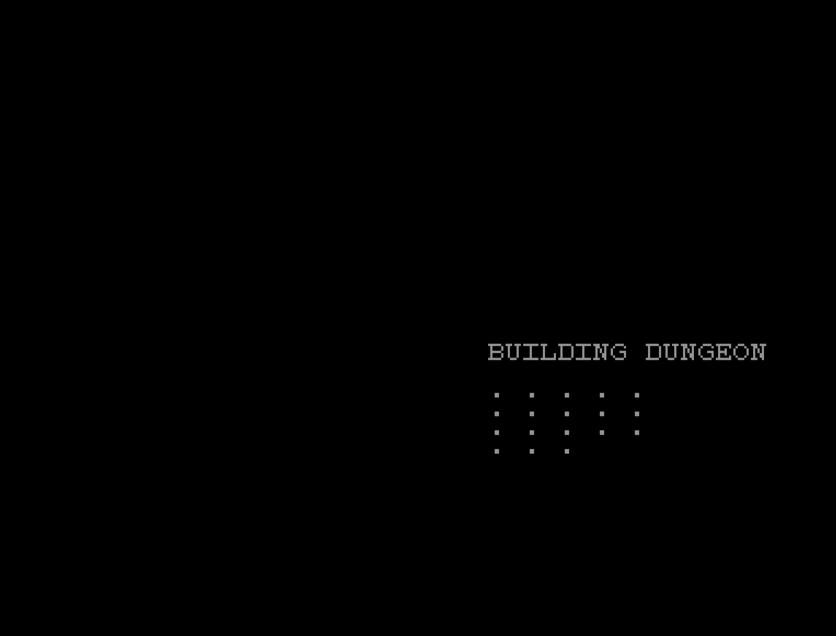
The same 5 percent is there during play too, but there you need to see the screen.
Skip the enemy loop when nothing has changed
With every enemy asleep and out of my zone, the loop still cost 238 ms a turn to decide, enemy by enemy, that there was nothing to do. If I am in the same zone as last turn, and last time the loop ran no enemy got a turn, the answer cannot have changed, so there is no need to ask again:
PA=INT(PX/7)+3*INT((PY-2)/7)
IF PA=PB THEN IF NZ=0 THEN RETURN
PB=PA:NZ=0
...
IF GW(G)=0 THEN IF GA(G)<>PA THEN GOTO NEXTENEMY
NZ=NZ+1
PB is the zone the loop last ran for, NZ counts the enemies that got a turn. The one thing that can change the answer without me changing zone is an enemy waking up, which happens in COMBAT and when the bolt hits, so both set PB=-1 (GW(G)=1:PB=-1) to force the loop to run next turn.
On the corridor walk the enemy half fell from 238 ms to 74 ms a turn. On level 5 with the explorer bot it fell by 121 ms a turn, and the final screen after 200 turns was identical to the run without the change: same map explored, same positions, same awake counts. Same game, less work.
The first single change to clear the 100 ms bar on its own.
Did we move the needle? All optimisations, together
All five keepers in one listing (no bounds checks, floor test first, POKE for the player, the enemy loop skip and no REMs in the hot routines), timed without the section timers against untouched part13e:
| Run | part13e | All five | Saved a turn |
|---|---|---|---|
| Corridor walk, 64 turns, enemies asleep | 0.55 s | 0.30 s | 250 ms (45 percent) |
| Level 5 explorer, 200 turns | 0.85 s | 0.61 s | 238 ms (28 percent) |
The small improvements do stack, the singles added up to about 280 ms on the corridor, the whole stack saved 250.
Player movement is now nearly twice as fast, and that is what the player would notice most.
One more small one went on top. The player’s zone, PA=INT(PX/7)+3*INT((PY-2)/7), now comes from two lookup tables filled once at the start, PA=ZX(PX)+ZY(PY). About 7 ms a turn, and it reads more clearly too.
Busiest variables first
A script counts how often each simple variable is named in the routines every run through and writes one line creating them busiest first:
G=0:CH=0:PX=0:PY=0:VA=0:EO=0:IX=0:IY=0:P$="":SA=0:OX=0:OY=0:MS$="":HA=0:...
It goes on the line straight after the CLR that sets the top of BASIC, so these become the first entries in the variable table. A is left out: the charset loader counts with it across the LOAD that restarts the program. Setting the rest to 0 changes nothing, since every one of them is given its real value later and a new variable starts at 0 anyway.
The counts are how often a name appears in the code, not how often each line runs, so they are a guess at the order. G (the enemy loop) and PX/PY come out on top, which matches the profile.
On top of the five keepers and the zone table, it saved 75 ms a turn on the corridor walk and 153 ms a turn on level 5. The second biggest single change, and it is one line.
Level 5 gains more because more of its turn is spent in the enemy code, which names a lot of variables.
Numbers as variables, and . for zero
The sources disagreed on whether a variable is quicker than a number written out. In my testing I saw either no better, or even slightly worse. 28 new variables make the table longer, so every other variable behind them takes longer to find, and reading a short number like 1 or 46 is not that slow in the first place.
BASIC reads . as zero without going through its number reading. This only saved around 3 to 7 ms per turn. Real benefit but tiny, and not good for readability, so it belongs in the crunched copy, not the one people read.
Where we stand
With everything kept so far, all still plain BASIC V2:
| Run | part13e | Stack + zone table + variables first | Faster |
|---|---|---|---|
| Corridor walk | 0.55 s a turn | 0.22 s | 2.5 x |
| Level 5 exploration | 0.85 s | 0.45 s | 1.9 x |
The listings: Readable, and Crunched
Writing the keepers into the listing properly, comments and all, gives part14a, the copy to read. part14b is generated from it by a small script, crunch.py: it drops every REM and the spaces, writes 0 as ., and packs lines together with colons, up to 79 characters.
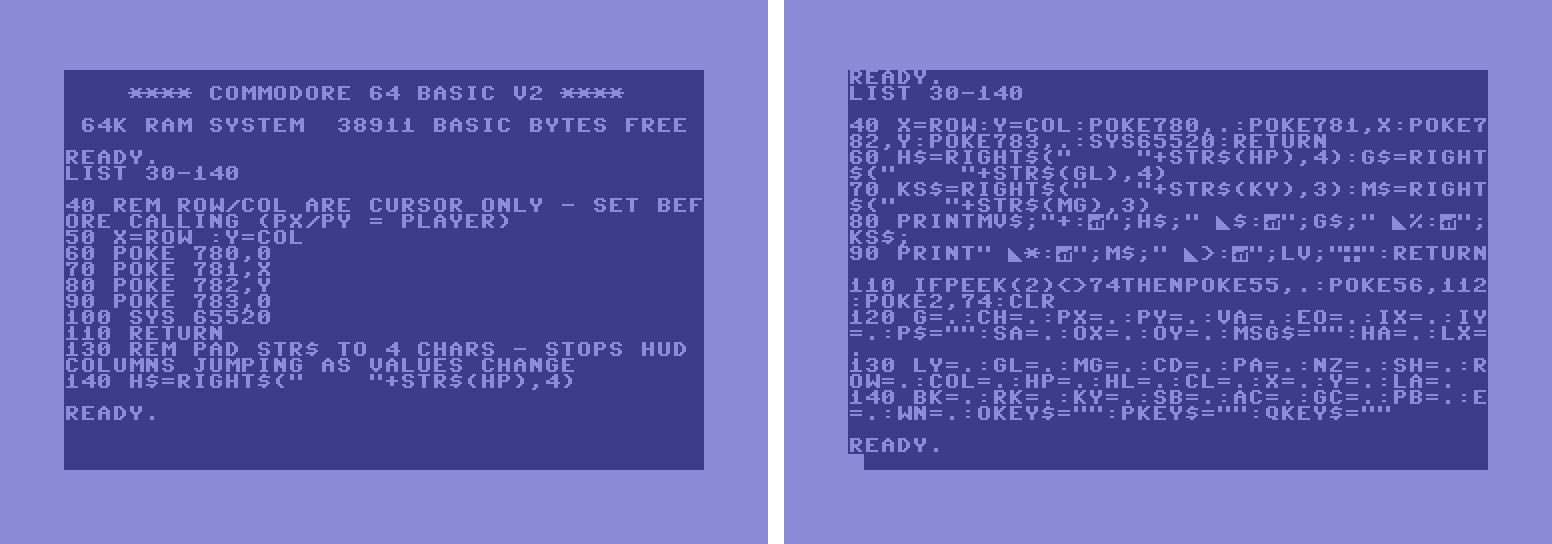
CURSORSET and its comments fill most of it. Right, the crunched part14b: CURSORSET is line 40, and the status line routine and the start of the program fit in the same space.The classic crunching trap is gluing a variable to the next word and spelling a keyword by accident. crunch.py checks for it by putting both listings through the IDE’s tokenizer and requiring the same count of every keyword.
That check caught a problem on its first run: 4 NEXTs and 15 GOSUBs went missing. The IDE read a line that starts with letters and then a colon as a label definition, so NEXT C: NEXT M crunched to NEXTC:NEXTM became a label called NEXTC, and packed lines like GOSUBLOGLINE:RL=... became labels too. That is the IDE’s label syntax, not anything on a real C64. The fix is to keep one space before the first colon of such a line (NEXTC :NEXTM), so it is not as crunched as it could be, and perhaps the VICE tools would be better overall.
| Run | part13e | part14a readable | part14b crunched |
|---|---|---|---|
| Corridor walk, a turn | 0.55 s | 0.25 s | 0.21 s |
| Level 5 explorer, a turn | 0.85 s | 0.50 s | 0.42 s |
| Tokenized size | 22,383 bytes | 9,764 bytes |
Crunching is worth 40 to 76 ms a turn on top of the readable version, but it gives back about 12K of BASIC memory.
Overall, 2.6 times faster, level 5 twice as fast, and 12KB saved.
Map Generation
Building a level takes about 16 seconds, so the build got the same treatment: TI around each step. The timers add their own cost, so the shares matter more than the totals:
| Step | Jiffies | Share | Per item |
|---|---|---|---|
MAPBLANK (clear, right and bottom walls) | 21 | 2% | |
MAPROLL, the BUILDING DUNGEON part | 719 | 61% | 29 a room (480 ms) |
of which cutting exits (EXITS, EXITUP, EXITLEFT) | 324 | 28% | 13 a room (216 ms) |
of which drawing the room (DRAWMT) | 163 | 14% | 6.5 a room (108 ms) |
| of which picking the shape | 110 | 9% | 4.4 a room (73 ms) |
| of which the loop and progress dot | 122 | 10% | |
STOCKING message and DISPLAY | 23 | 2% | |
POPULATE, the STOCKING DUNGEON part | 359 | 31% | |
of which PLACEONE (15 items and enemies, 29 tries) | 253 | 22% | 17 an item (280 ms) |
Level 5 is the same for the map (same rooms from the same seed) and a little more for POPULATE (19 placements vs 15).
Hot spots:
Creating exits costs twice as much as drawing the room, surprisingly. Each exit is its own CURSORSET and PRINT of one to three dots, and most rooms get one or two. Floor and wall are both grey (12) in colour memory, so in fact an exit only needs the character changed. One POKE to the hidden screen per cell, no cursor placement needed, and no colour.
PLACEONE takes 280 ms an item and each item is a CURSORSET and PRINT of one character, where two POKEs (character and colour) would do.
PLACEONE moved to the top of the listing, next to the other hot routines, and placing by POKE. Plus a lookup table for each item’s screen code and colour:
REM ITEM TABLE: SCREEN CODE AND COLOUR OF EACH THING
REM PLACEONE PUTS ON THE MAP. 1 SHIELD, 2 KEY,
REM 3 HEART, 4 POTION, 5 CHALICE, 6 SWORD, 7 JEWEL,
REM 8 RAT, 9 GOBBO, 10 DOOR, 11 STAIRS
DIM IK(11),IC(11)
FOR N=1 TO 11 : READ IK(N),IC(N) : NEXT N
DATA 27,3,37,8,43,10,42,7,40,4,47,1
DATA 36,7,41,15,38,5,63,9,62,13
Result: the map generation went from 16.0 s to 15.0 s. About 6 percent. I had predicted a saving of 3 to 4 seconds.
Placement did improve but exits hardly moved the needle. Exits were never slow in practice because of drawing. Their 200 ms a room is due to the logic, a random roll plus nine IF lines, and two GOSUBs.
Comments cost memory
Testing hard stopped at this point with ?OUT OF MEMORY ERROR.
| Listing | Free memory |
|---|---|
| part13e | 3,171 bytes |
| part14a | 1,550 bytes |
| part14c | 443 bytes |
part14a, long REM blocks trimmed | 3,082 bytes |
part14c, long REM blocks trimmed | 2,146 bytes |
Every comment is stored in the program, and since part 13 took 1K for the hidden screen BASIC has about 26K. 14a’s extra lines and 14c’s item table, DATA and comments ate most of what was left; the test harness’s own code and arrays did the rest.
Now long comment blocks go into the article instead. The 35-line header (with the tile-symbol table, and a TODO list that still said “fog of war” and “speed”) gets cut down to three lines, and the 10-line memory-map essay became two. Short comments in the code can stay.
Spending the freed memory with wall styles
Crunching freed up BASIC memory from 2,146 bytes to 13,972. So I wanted to add an enhancement that has been waiting since almost the beginning.
The character set has three wall glyphs in the character set, but the game only ever draws # as a wall. Rather than add logic to determine the character to draw, instead I chose to change what # looks like on each level by overwriting its 8 bytes in memory before the map is drawn. Nothing in the game logic has to change at all but we get variety in visuals.
I could have done this a few ways but I chose to keep the bytes in DATA rather than copying them out of the character set. They are read once only into a small integer array (48 bytes so quick):
DIM WS%(2,7)
FOR N=0 TO 2 : FOR J=0 TO 7 : READ WS%(N,J) : NEXT J : NEXT N
DATA 254,212,170,212,170,212,170,0
DATA 239,138,12,0,254,170,128,0
DATA 114,168,212,160,78,29,154,5
and then before each level is built:
N=LV-1-3*INT((LV-1)/3)
FOR J=0 TO 7 : POKE 31000+J,WS%(N,J) : NEXT J
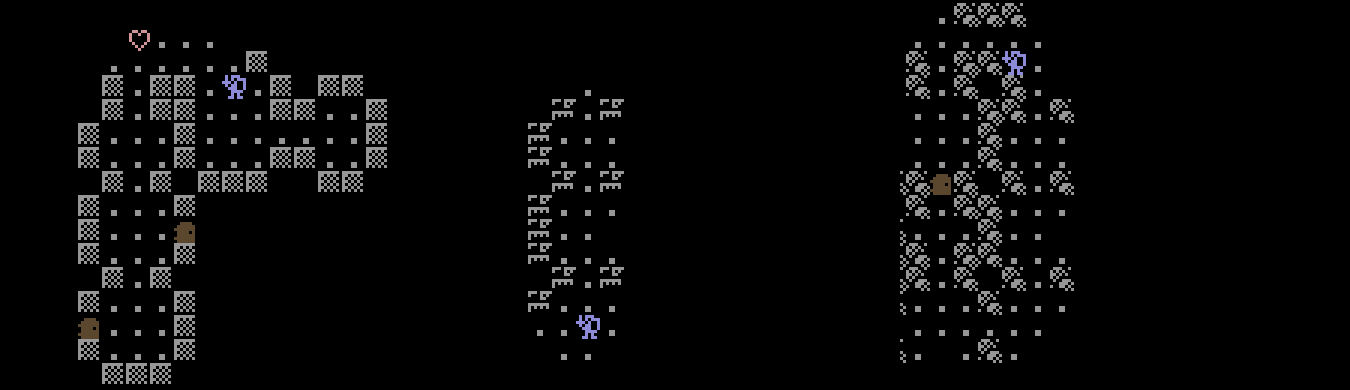
# character.There is enough free memory for more enhancements, such as different potion types and more enemies, but that is left as an exercise for the reader!
Final Numbers
So after all that, did the game improve?
Yes, the game is noticeably more nimble and we even freed up memory to add more enhancements. It’s still not a twitchy arcade experience, but it doesn’t need to be.
In plain numbers, when you press a key to walk, the game used to take over half a second to answer, and the crunched listing now responds in about a 1/5th of a second (0.55 s down to 0.21 s). On the busy level 5, with gobbos chasing, a turn went from 0.85 s to 0.42 s.
Building each level is about a second quicker (16 s down to 15 s), and that is now the one place the game really makes you wait. And where part thirteen left about 3.6K of memory free, the crunched listing has about 14K, even with the new walls.
Overall, player and enemy moves are about twice as fast, depending on how many visible enemies the screen shows. Not bad!
Play the game
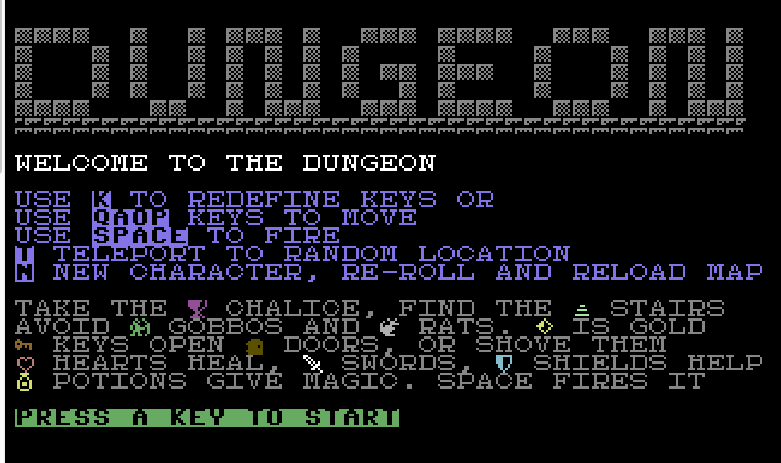
The finished listing, part14f with the new walls, runs in the online IDE, so you can play it in your browser right now. Then have a look at the code, change something and see what happens.
Commodore 64 BASIC Programming Series: all the parts
- Part 1: Introduction to Commodore BASIC
- Part 1.5: Installing CBM Prg Studio on Mac/Linux
- Part 2: Commodore BASIC Commands GOSUB and FOR Loops
- Part 3: If/Then, Game Logic and Cursor Movement
- Part 4: The Magic of POKE
- Part 5: C64 DOS Commands
- Part 6: Working with Data Files
- Part 7: Dungeon Crawler
- Part 8: Goblin Attack!
- Part 9: The Goblins Strike Back
- Part 10: Generating a Walkable Map
- Part 11: Stairs, Levels and Levelling Up
- Part 12: Rats, Shields and Fireball Magic
- Part 13: Fog of War and the Need for Speed
- Part 14: More BASIC Optimisations
 C64 BASIC Dungeon Crawler: Fog of War and the Need for Speed (Part 13)