
When we think of Dungeon Crawler games, or “Roguelikes”, we never really have in mind a game that traps you. It’s the bare minimum that you should be able to solve the maze, right? So it’s long overdue that I fix the problem, but within the limitations of Commodore BASIC on the C64, so no fancy algorithms.
How can I make sure the maze is walkable, minimising the need for teleportation, without making it slow to generate? Keep in mind that the vast majority of games from the era either were slow to generate or switched to assembly …
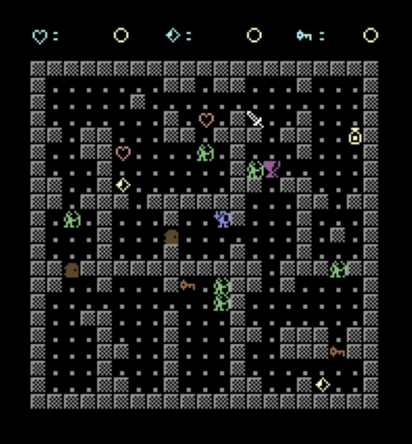
You can play and view the code for the finished part 10 in the RGC online IDE, there are also the three steps that get us there:
- part10a.bas is the new map
- part10b.bas adds winning
- part10c.bas adds goblin optimisation
Go back if you missed part nine.

Why the maze didn’t work well
If you recall, my map was being generated using “meta tiles” in a 7 by 7 grid. A meta tile is a small block of characters drawn as one piece, picked at random from a set of shapes (corridor, corner, T-junction, room and so on).
Being random, some results worked better than others. There was no algorithm, just randomly draw the next tile in the correct place. Later we added object/enemy placement, but still it wasn’t what I would describe as actual procedural generation.
The outcome was walls would block your way. Every tile featured its own walls, so tiles side by side could easily end up with double walls.
Nothing matched a tile’s exits to the next tile. A - corridor next to a | corridor created a dead end on both sides.
What really highlighted the dumb nature of the map generation were the doors. A door could be placed over any empty floor cell, meaning a door could sit smack in the middle of a room with open floor all round it.
Thing is, for this game, it doesn’t need to be a maze, just a varied dungeon you can actually navigate.

You can now follow the tutorials and edit the code right in your web browser with the Online Retro IDE
– No downloads, configuration, etc necessary, and it is free!
The new dungeons
For the new system, I am still going with meta tiles, but now laid out in a 5 x 5 grid. Each room is 3 by 3 cells inside its walls, whereas before the walls were part of the 3 by 3.
Each room draws only its top wall and its left wall. Walls between rooms are then drawn one character thick. Rooms are an odd number of cells across, so each side has a middle cell, and that is where doorways go. This means a doorway always faces open space on both sides.
Rooms on the right-hand and bottom edges have no neighbour to share a wall with so MAPBLANK draws just those two sides of the border.
DRAWMT moves the cursor once and prints the whole room in one PRINT. NL$ holds one cursor down, four cursor lefts and a #, which is “next row, back to the left wall”.
NL$="{DOWN}{LEFT}{LEFT}{LEFT}{LEFT}#"

DRAWMT:
ROW=TY : COL=TX : GOSUB CURSORSET
PRINT "{GREY}####";NL$;MT$(MT,0);NL$;MT$(MT,1);NL$;MT$(MT,2);
RETURN
Rolling Exits
Shapes no longer decide where the exits are so now I roll that separately in EXITS, after the room is drawn. Every room opens its top wall, its left wall, or both.
There are three exceptions. The top row has no room above, so it always opens left, and the left column always opens upwards. The top left room, 0,0, opens neither up nor left because that is the top-left border.
ET=0 : EL=0
R=RND(1)
IF R<.35 THEN ET=1
IF R>=.35 AND R<.7 THEN EL=1
IF R>=.7 THEN ET=1 : EL=1
IF RY=0 THEN ET=0 : EL=1
IF RX=0 THEN EL=0 : ET=1
IF RX=0 AND RY=0 THEN ET=0
ET is “open the top”, EL is “open the left”.
This means from any room there is always a way up or a way left. Each step takes you one row or one column closer to room 0,0, so you can always get there. It follows that if every room can reach the top-left room then any two rooms can reach each other.
Maze books call this the binary tree algorithm, with “binary” because each cell picks between two directions. It needs no memory of where it has been and no checks afterwards, which suits interpreted 8-bit BASIC.
A pure binary tree maze gives exactly one route between any two cells but we have random rolls which potentially add other openings, so there are loops and more than one way round.
It does however mean the top row is always one connected run, and so is the left column. Will that impact gameplay? On the plus side, this is now the first version of my dungeon where every key, heart and chalice can be reached without teleporting!
Doorways and Added Variety
An opening can be one of two kinds. Three times in four it is a doorway. The other time, the whole three-cell wall vanishes, which merges two rooms to make one bigger one.
The corner posts between rooms always stay, currently.
EXITUP:
IF RND(1)<.25 THEN ROW=TY:COL=TX+1:GOSUB CURSORSET:PRINT "...";:RETURN
ROW=TY : COL=TX+2 : GOSUB CURSORSET : PRINT ".";
NC=NC+1 : DX(NC)=COL : DY(NC)=ROW
RETURN
EXITLEFT is the same turned on its side. Its whole-wall version prints three dots downwards with cursor down and cursor left between them.
Each one-cell doorway goes into a list as it is made: DX and DY hold its column and row, NC counts them. That list can never grow to more than 40. Four rows of five rooms can open upwards, and four columns of five can open left.
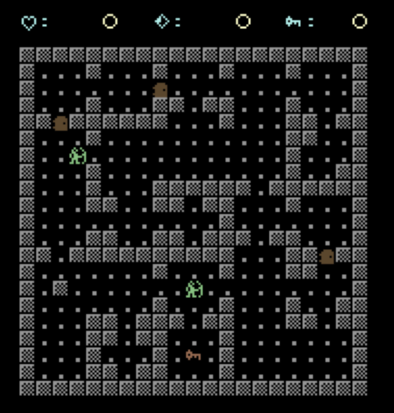
POPULATE used to drop doors on random floor tiles, now it chooses them from the doorway list.
To avoid picking the same doorway twice, I copy the last entry in the list over the one just used and drop the count by one.
Whole-wall openings never get a door, because they are not in the list.
ND=INT(RND(1)*3)+2
IF ND>NC THEN ND=NC
IF ND=0 THEN GOTO NODOORS
FOR N=1 TO ND
Q=INT(RND(1)*NC)+1
ROW=DY(Q) : COL=DX(Q) : GOSUB CURSORSET : PRINT "{BROWN}?";
DX(Q)=DX(NC) : DY(Q)=DY(NC) : NC=NC-1
NEXT N
If a map has no doorways at all, IF ND=0 jumps past both the door loop and the key loop. A plain FOR N=1 TO 0 would not skip them. This BASIC checks the limit at NEXT, after the loop body has run, so every FOR loop runs at least once.
What changes when you play
Doors actually matter now. Before, you could walk round most of them, making them a bit silly.
Goblins cannot open doors, fortunately. That makes a door something to hide behind when your hit points are low.
A key can land on the far side of the door it is meant for. There is often another route. If there is not, there is still the brute-force option, breaking a door down costs 4 hit points.
For the Win
Picking up the chalice right now wins the game. Until this change there was no way to finish the game, you could only start over.
The chalice is picked up inside COLISSION, which is reached by GOSUB KEYS from the main loop.
Pickup sets a flag, WN=1, and returns as normal. Jumping directly to a win screen from there would leave that GOSUB waiting for a RETURN that never comes. Each one left behind uses up some of BASIC’s stack, and wasting enough of that causes ?OUT OF MEMORY ERROR.
IF CH=40 THEN GL=GL+10:WN=1:MSG$="CHALICE 10 GOLD":GOSUB TAKEITEM
The main loop checks the flag once it is back at the top level, where a GOTO is safe. Same pattern as the HP check that ends the game when you die.
IF WN=1 THEN GOTO YOUWIN
The check sits before GOSUB ENEMYLOGIC, so no goblin can take a sneaky swing at you.
YOUWIN prints “YOU WIN!” currently, and then joins the game over code at a new label, ENDPANEL, for the gold total and “PLAY AGAIN, Y OR N”. One panel, two ways in.
YOUWIN:
GOSUB SHOWHUD
ROW=12 : COL=24 : GOSUB CURSORSET : PRINT "{YELLOW}YOU WIN!";
GOTO ENDPANEL
INITPLAYER sets WN=0, so a new game does not start already won.
Sleepy goblins
Until now every goblin took its turn after every move, wherever it was on the map. Each one takes about 165 milliseconds, so six goblins is a second of waiting per move. That’s a lot, even in a turn-based game.
Very little of that time is the drawing, though. It is BASIC working through the goblin’s logic. Each iteration reading its position from the arrays, six IF tests, a PEEK at the screen. A goblin stuck behind a wall on the far side of the map wastes nearly as much time each turn as one that is chasing you.
Unsurprising then that my fix was to not run that logic for far-away goblins! I split the map into 9 zones in a 3 by 3 grid. A zone number comes from a cell’s column and row:
PA=INT(PX/7)+3*INT((PY-2)/7)
INT(PX/7) is how many whole sevens fit into the column: 0, 1 or 2, which is the zone across. The same sum on the row gives the zone down. The -2 is there because the map starts on screen row 2.
Across plus 3 times down turns the two answers into one number from 0 (top left) to 8 (bottom right). One number is quicker to compare than two.
PA is the player’s zone, worked out once per turn before the goblin loop starts.
GA(G) holds each goblin’s zone. It is worked out when the goblin is placed and again only when it moves.
A goblin that is not taking turns is not moving, so its zone never needs figuring out. Checking it is one array read and one comparison.
IF GW(G)=0 THEN IF GA(G)<>PA THEN GOTO NEXTENEMY
Read as: if this goblin is asleep, and it is not in the player’s zone, skip it.
IF ... THEN IF ... THEN is two tests in a row. BASIC stops at the first one that fails, so an awake goblin never has its zone checked.
GW(G) is the awake flag. 0 is asleep, 1 is awake.
Zones do have a blind spot. A goblin standing right next to the player, but on the other side of a zone line, can never move or fight back, so attacking a goblin wakes it.
COMBAT sets the flag:
GW(G)=1
An awake goblin ignores zones and follows the player, even across the whole map, for the rest of the level.
What is left gives you one free attack at a sleeping goblin across a zone line. Then it wakes up.
Goblins in the player’s zone behave as before and they go back to sleep if the player leaves their zone.
I first measured a faster way to move the cursor, since that looked like the slow part. In the actual game, though, it only made a turn 3% faster.
This change does make a noticeable difference. Many optimisations don’t result in anything perceptible but I think this one was worthwhile:
| Same 20 turns, same game, six goblins | Before | After |
|---|---|---|
| Goblins’ share of a turn | 990 ms | 556 ms |
| Whole turn | 1.42 s | 0.99 s |
Combat prevents a chasing enemy from soaking up all the performance gains. A goblin has 10 hit points and is usually dead two or three hits after it wakes, plus a dead goblin is skipped.
You could, however, end up with several awake at once if you hit one and walk away, then do it again.
This is the one speed optimisation I could do right away but I might come back to it in a dedicated speed-up part, and throw everything else I can think of at it.
What Next?
Up to now we have essentially been creating a framework rather than a game as such. Next up we can start adding details to make the game more challenging and fun:
- Level progression. Get the chalice(s), reach the exit, go down a level. The
>stairs glyph has been in the character set for a while with nothing using it. - We also need to reward your character with buffs as well as gold.
- Potions need to get a real purpose. The
*potion up to now just gives 10 gold, the same as a jewel. - After that, let’s add Rats as a new enemy type that moves randomly.
 Worth a Watch issue 04