
Strings are variables made up of text characters, for example NAME$="CHRIS".
Commodore 64 BASIC Programming Series
Part 1: Introduction to Commodore BASIC
Part 1.5: Installing CBM Prg Studio on Mac/Linux
Part 2: Commodore BASIC Commands GOSUB and FOR Loops
Part 3: If/Then, Game Logic and Cursor Movement
Part 4: The Magic of POKE
Part 5: C64 DOS Commands
Part 6: Working with Data Files
Part 7: Programming C64 with Visual Studio Code
Part 8: C64 BASIC String Manipulation
Part 9: C64 Text Adventure Game
Part 10: Objects and Actions in Commodore 64 Text Adventures
C64 BASIC was unusual for the time as it allowed you to create and manipulate text string variables without having to reserve space or define them before using them.

Text Adventure Games
This ease of use of BASIC and immediate understanding of how strings worked meant that many of us 1980s kids could easily create text-heavy “choose-your-own adventure” style games.
These are games where instead of moving a joystick to control a character on screen, the player could make decisions that changed the outcome of a story, such as "Do you climb the ladder? Yes/No".
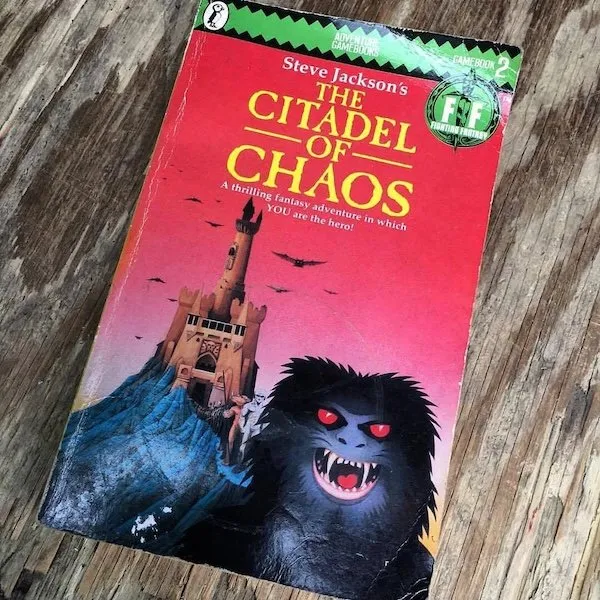
Having a fixed choice of optional directions or decisions meant the style of game is sometimes described as a “story with options” rather than an “adventure” per se, but even the books in print often offered random elements and even player character development using upgrades and health stats.
Sometimes these style of adventures are called Game Books (or Gamebooks). I quite like that, and prefer it over the stuffy-sounding Interactive Narrative Adventure. As a general term, apparently the correct phrase to use is “Interactive fiction“, but that covers a huge range of ideas.
A massive upgrade to the “select path A or path B” type of interaction, however, was the true Text Adventure, in the style of Zork and the Scott Adams series (not the creepy cartoonist, I mean the highly talented games innovator).
In those games, there was a world to explore, and the computer understood your typed plain English instructions … or at least it felt that way.
One of the best examples of a game that felt like the source/inspiration was HHGTG, which you can play online right now thanks to the BBC!

The downside to the full text adventure style was the amount of work involved in creating them, debugging them, and even playing them.
With this in mind we will start simple and then build up in complexity as we go!
Regardless of how sophisticated you develop it, these types of games are excellent ways to introduce you to the Commodore BASIC v2 string commands and features, while giving you to ability to create really fun games to share with your friends and family!

You can now follow the tutorials and edit the code right in your web browser with the Online Retro IDE
– No downloads, configuration, etc necessary, and it is free!
Where we are going
In this part of the C64 BASIC tutorial series, we will look at the various ways we can work with strings, and develop a “choose your own” adventure.
While we are focussed on just the C64 here, any computer using Commodore BASIC Version 2 can follow along, and other versions of CBM BASIC too, minus color/formatting stuff.
Plus, Commodore BASIC is really just Microsoft BASIC with some tweaks, so it should port to most home computers of the 1980s pretty easily with only minor changes.

Over future parts we will develop a reusable Text Adventure Game Engine along with an example mini C64 text adventure; “Murder House“ (dun, dun, dunnnnn).
This engine will allow us, with only small changes, to create as many new and unique adventures as we want.
Let’s get started, shall we?
Commodore BASIC Strings and Memory
Commodore BASIC v2 Strings use more space than just the text that they contain, and the interpreter had no way to know if any of the variables were still in use or were junk (“garbage collection”).
As well as the contents in memory, a byte is used to provide the length of the string (up to 255 bytes), and two bytes are used to point to where in memory it lives. You might think losing those extra three bytes is all well and good but for BASIC it is your whole string times two plus those 3 bytes and two unused bytes (because all variables on the C64 use at least 7 bytes).
This is because instead of BASIC using the string contained in your BASIC listing, it takes a copy of your string and puts it in string storage. If you concatenate a variable, another duplicate is made!

In the basic program above I demonstrate the memory before and after doing a simple string concatenation in a loop. We get the free memory using the memory addresses of the start and end of the string area:
S=(peek(52)-peek(50))*256+(peek(51)-peek(49))
As you can see, the tiny basic code listing (70~ bytes after crunching) plus that one string, concatenated with a number up to 1,000 (50 bytes or so?) somehow adds up to a lot more than you would expect!
This clunky approach goes therefore for any computer based on that version, including certain PET machines, the Vic 20, and the C128 in C64 mode. Later versions had more advanced BASIC and did things a little differently.
One of the reasons Vic 20 owners (and probably even worse for ZX80/ZX81 owners) got frustrated and gave up programming their computers is text-based games were easier to get started with, so we leaned into using lots of text, and very quickly ran out of memory.
It gets even worse when we use strings in Arrays, because of course the interpreter then needs to keep track of the string within the array list items.
For now, we will just create BASIC code that we can follow, and not worry too much about memory optimization, and we certainly won’t be worrying about speed too much as text adventures are “logic puzzle” type games rather than millisecond reaction time arcade action!
Naming String Variables in Commodore BASIC
A String on the C64 can be up to 255 characters as mentioned, and must have the $ after the variable name.
All C64 variable names are one or two characters long, or a letter and a digit. Confusingly, A is an entirely different variable to A$, or even A$(0)!
You can use longer variable names, but only the first two characters matter, so abcd$ and ab$ are the same variable.
Another point of confusion, but a logical one once you know about it, you can not use a BASIC keyword as your variable name or part of your variable name. What does that mean?
In our example of abcd$ we are fine, but we could not call it abcdef$ because that contains the C64 BASIC keyword def!
C64 and Commodore BASIC V2 String Commands
Printing strings to the screen is as simple as saying print s$ where s$ is your string variable name. We can also use , and ; to help format how the string will appear in terms of layout.
, tells your C64 that you want the next part to appear at the next “tab” column (they are ten characters wide).

This is obviously useful when you want to print columns of information, or tabulated data as it were.
The semicolon tells BASIC that you do not want to move to the next line after printing:

Numbers are always printed with a leading space for positive numbers and a minus sign for negative values, and are always with a trailing space. This can be frustrating or useful depending on the effect you are going for, but as we will see later we can do something about this with careful string manipulation.
If you want extra space to pad out your display, as well as the cursor movement control codes, we have SPC() and TAB() which will output the number of spaces or tabs that you wish.
We saw earlier that we can join, or “Concatenate“, strings using the plus + sign. Eg. n$="retro" + "games" so quite often you will see those features used in combination:


To find out how long our string has become we can use len:
print len(n$)
C64 String Comparison
You can compare strings using the regular math symbols, aka <, <=, =, <>, >=, >
While = and even <> make mostly immediate sense, what do the others do?
Go to your C64 or C64 emulator and enter the following:

Why did it do that? It is not comparing the length of the string, well not directly.
What BASIC is comparing is the ASCII (actually I guess the Commodore PETSCII to be precise) numerical value of the strings. We can test this by comparing two strings of equal length:

True and False in Commodore BASIC
But why -1 for true and 0 for false?
While other systems represent true as either 1 or any non-zero value, in the world of Commodore BASIC, “true” is represented by −1 and “false” is represented by the value 0. This is because in the way the C64 stores numbers, -1 in binary is 11111111 and 0 is 00000000!
Each printable character has a numerical value, for example the blank space is 32 and the letter A is 65. We can find this number using the ASC command:

If you want to do the reverse, and print or use a character using the characters code, you can use CHR$ – this is very useful when using the PETSCII control codes instead of entering them using the keyboard combinations. For example, to clear the screen we can use:
print chr$(147)
Remember this is the character code number, not the value of the numerical digits contained in the string. Convert a String to a Number we use VAL and to convert a number to a string we use STR$ as in our earlier example where we added the number from our FOR loop.
Extracting Parts of Strings
For our text adventure, it is vital that we can interpret not just whole strings but parts of strings.
The typical example is to take the action word (“verb”) and the object of the action (“noun”) as two different values so we can parse the instruction appropriately.
LEFT$ returns the left N characters of a string
RIGHT$ returns N characters from the right of a string
MID$ extracts the characters from anywhere in a string, starting from your selected start point and ending either at the end of the string or the specified number of characters.
(NB. These string operations all start counting at 1, not 0)

Note, this only works because we know where to find the elements we need. In later versions of Commodore BASIC we could use a command called instr to find the spaces so we know each part’s beginning and end points, but in Commodore BASIC v2 as on the C64, we would have to slowly go through the string ourselves character by character and stop when we hit a space!
Worth keeping in mind when later we come to check for “LOOK” versus “SEARCH” or “EXAMINE” …
Later versions of Commodore BASIC MID$ can also replace the characters at a chosen position in a string! This and INSTR were used for a lot of business purposes, like database-style applications and record keeping, allowing data to be stored in comma-delimited text files for batch-processing.
Creating a Choose Your Own Adventure
We have more than enough idea of what the C64 can do with strings now for us to create a super simple “choose your own” adventure.
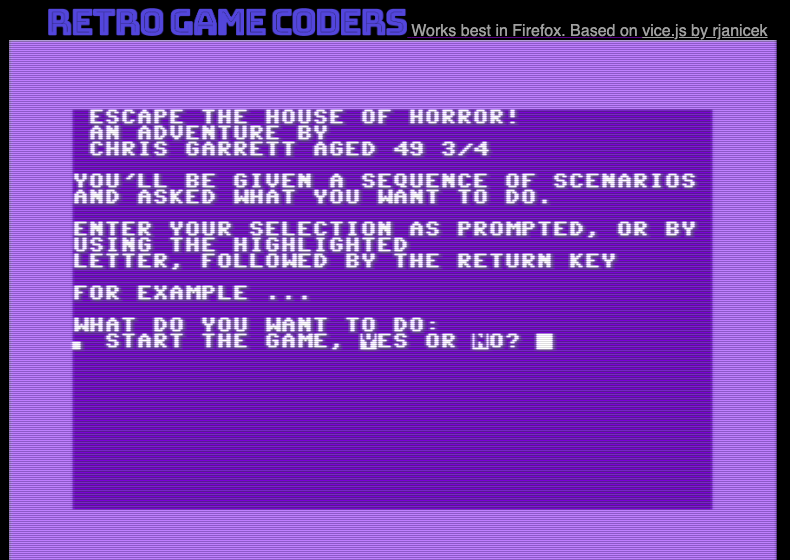
You can play my simple example right now in your web browser and examine the code. I recommend playing first so you don’t spoil the galaxy-brain-clever puzzle.
Before rushing into the code, though, it is a good idea to do a tiny bit of planning. If you look at my code from when I was nine and ten years old creating these games on my Vic 20, you would see how a lack of planning quickly creates a mess of GOTO statements that prevent even the programmer understanding what is going on.
At the very least we need to break our adventure into sections:
rem show titles
rem instructions
rem first scene
rem ...
rem success
rem fail
You are going to need to show your title page, some scenes (mostly rooms, but not necessarily), the player will need to make decisions and your game will then need to branch off to either another scene or the win/fail conditions.
Even doing this directly in the code editor can soon get very tricky, especially when you can get to different rooms in multiple ways, or if you have conditions such as “is it dark or did they switch on the light?“, therefore you might find it easier to start with a flow chart:
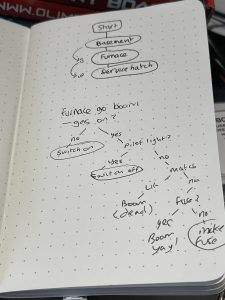
Let your ideas flow free and then reign them in later when you come back to ensure there is logic and fun to your game.
For our simple scenario we don’t need anything complex. I did consider having the player escape through the use of a Rube Goldberg mechanism, but I decided to keep things more straightforward here.
So as not to repeat ourselves too much, and for a consistent look and feel, I created a subroutine that expects a question string and I called it q$. When the player answers we set the answer string, a$.
The most simple version of this is the first one:
IF LEFT$(A$,1)<>"Y" THEN GOTO 1
This means the player must enter Y because anything else makes the game go back to the start.
Rather than input we could probably have used GET which would have meant the player could just press the correct key, no return key required. The reason these kinds of games went with text input instead of key presses are the scenarios where the player is asked their name, or to enter a bid value (eg. “what will you offer the vendor for the golden sword of unlimited chipotle?”).
I am not sure how I feel about one part having Yes/No answers and another a selection from 1 to 3. If it was always a straightforward menu then you could even play it with a joystick …
Keeping Secrets
Browsing the code shows another issue that would come up with the “type in and play” BASIC games listing magazines and that is when we type in the text we see the puzzles and their consequences.
In fact, just seeing the list of verbs could offer massive clues to puzzle solutions, for example seeing “pray” as a verb is unusual, wonder why you would need that? Or “poison”, that is an interesting one.
This meant a lot of the magazines and books would take steps to obfuscate things, such as having all the room names, descriptions, and objects long strings then extract parts as required using mid$.
The problem is, it also made typing in the listings (and editing the transcript, I expect!) even more difficult.

Choose Your Own Adventure Code
There is a lot of benefit to be had typing in code listings but you don’t have to, it is all on Github!
1 REM SHOW TITLES
2 GOSUB 86
3 PRINT " ESCAPE THE HOUSE OF HORROR!"
4 PRINT " AN ADVENTURE BY"
5 PRINT " CHRIS GARRETT AGED 49 3/4"
6 REM INSTRUCTIONS
7 PRINT ""
8 PRINT "YOU'LL BE GIVEN A SEQUENCE OF SCENARIOS AND ASKED WHAT YOU WANT TO DO."
9 PRINT ""
10 PRINT "ENTER YOUR SELECTION AS PROMPTED, OR BY USING THE HIGHLIGHTED"
11 PRINT "LETTER, FOLLOWED BY THE RETURN KEY"
12 PRINT ""
13 PRINT "FOR EXAMPLE ..."
14 Q$ = "START THE GAME, "+RV$+"Y"+RO$+"ES OR "+RV$+"N"+RO$+"O"
15 GOSUB 90
16 IF LEFT$(A$,1)<>"Y" THEN GOTO 1
17 REM FIRST SCENE
18 GOSUB 86
19 PRINT "YOU ARE IN A COLD, DARK CELLAR. THE ONLY LIGHT IS WHAT LITTLE FILTERS"
20 PRINT "THROUGH THE CRACKS IN THE BOARDED UP"
21 PRINT "WINDOWS. NORTH IS A SECURE DOOR,"
22 PRINT "THERE IS AN OPEN DOOR TO THE SOUTH."
23 PRINT "YOU ARE CARRYING A BOOK OF MATCHES."
24 Q$ = RV$+" 1"+RO$+". EXAMINE SECURE DOOR, " + BL$ + RV$+" 2"+RO$+". GO SOUTH"
25 GOSUB 90
26 IF LEFT$(A$,1)<>"1" THEN GOTO 35
27 GOSUB 86
28 PRINT "THE DOOR IS HEAVY, METAL, AND MASSIVE."
29 PRINT "IT REMINDS YOU OF A BANK VAULT AND"
30 PRINT "CLEARLY YOU'RE NOT GETTING OUT THIS WAY!"
31 Q$ = "GO BACK "+RV$+"Y"+RO$+"ES OR "+RV$+"N"+RO$+"O"
32 GOSUB 90
33 IF LEFT$(A$,1)<>"Y" THEN GOTO 27
34 GOTO 18
35 GOSUB 86
36 PRINT "THE FURNACE ROOM IS A PARTITIONED"
37 PRINT "OFF SPACE BUILT WITH DRYWALL TO"
38 PRINT "SIMPLY CONTAIN THE FURNACE AND"
39 PRINT "ELECTRICAL PANEL. YOU CAN SMELL"
40 PRINT "GAS ..."
41 PRINT ""
42 PRINT "ABOVE YOU IS A SMALL HATCH."
43 Q$ = RV$+" 1"+RO$+". BACK TO THE CELLAR, " + BL$ + RV$+" 2"+RO$+". GO UP"
44 Q$ = Q$ + BL$ + RV$+" 3"+RO$+". LIGHT MATCH"
45 GOSUB 90
46 IF LEFT$(A$,1)="1" THEN GOTO 18
47 IF LEFT$(A$,1)<>"1" AND LEFT$(A$,1)<>"2" AND LEFT$(A$,1)<>"3" THEN GOTO 35
48 IF LEFT$(A$,1)="3" THEN GOTO 75
49 GOSUB 86
50 PRINT "YOU ARE IN A SMALL SPACE DIRECTLY"
51 PRINT "ABOVE THE FURNACE THAT YOU"
52 PRINT "ASSUME MUST BE A SERVICE HATCH."
53 PRINT "ON ONE WALL SEEMS TO BE AN EXHAUST VENT"
54 PRINT "WHICH IS LETTING IN A TINY AMOUNT OF"
55 PRINT "LIGHT AND COLD AIR"
56 Q$ = "GO BACK "+RV$+"D"+RO$+"OWN OR E"+RV$+"X"+RO$+"AMINE THE VENT"
57 GOSUB 90
58 IF LEFT$(A$,1)="D" THEN GOTO 35
59 IF LEFT$(A$,1)<>"D" AND LEFT$(A$,1)<>"X" THEN GOTO 49
60 GOSUB 86
61 PRINT "THE VENT COVER IS FLIMSY AND LOOSE."
62 PRINT "YOU THINK IT WOULD NOT TAKE MUCH TO"
63 PRINT "REMOVE IT!"
64 Q$ = "GO "+RV$+"B"+RO$+"ACK OR "+RV$+"H"+RO$+"IT VENT"
65 GOSUB 90
66 IF LEFT$(A$,1)="B" THEN GOTO 49
67 IF LEFT$(A$,1)<>"B" AND LEFT$(A$,1)<>"H" THEN GOTO 49
68 REM SUCCESS CONDITION
69 GOSUB 86
70 PRINT "THE VENT SCREEN COMES LOOSE AND YOU"
71 PRINT "ATTRACT THE ATTENTION OF A PASSER-BY"
72 PRINT "THE POLICE ARE CALLED AND SOON YOU"
73 PRINT "WILL BE FREE!"
74 GOTO 94
75 REM FAIL
76 GOSUB 86
77 PRINT "BOOM!"
78 PRINT ""
79 PRINT "THE LAST THING YOU ARE AWARE OF IS"
80 PRINT "A BRIGHT FLASH AND A SEARING HEAT"
81 PRINT ""
82 PRINT "UNFORTUNATELY YOU HAVE BLOWN UP"
83 PRINT "THE HOUSE WITH YOU INSIDE IT!"
84 PRINT ""
85 GOTO 94
86 Q$="": A$="": REM RESET VARIABLES TO BLANK
87 RV$=CHR$(18): RO$=CHR$(146): BL$=CHR$(13) + CHR$(187) + CHR$(32): REM REVERSE ON AND OFF TO MAKE LISTING THE CODE EASIER
88 PRINT CHR$(5): PRINT CHR$(147): PRINT CHR$(19);: REM CLEAR SCREEN, WHITE TEXT
89 RETURN
90 PRINT ""
91 PRINT "WHAT DO YOU WANT TO DO: " + BL$ + Q$;
92 INPUT A$
93 RETURN
94 PRINT ""
95 PRINT ""
96 PRINT "GOODBYE!"
Shrinking the Code and the Commodore Vic 20
Just for fun, I checked out if this would fit into the unexpanded Vic 20 memory, seeing as that machine also uses Commodore BASIC V2, and it does fit …. Just!
That is, of course, before crunching, so a lot of space could be freed up by removing the comments and unnecessary spaces.
If you would like to check it out for yourself you will need to change line 87 due to the different area of memory that defines the border and background colours:
87 poke 36879,6
Of course, it still isn’t really playable because of the 22 column screen on the Vic20, so a lot more work would need to be done.
That all said, I was surprised how little space this game took. I guess I have learned some lessons in my … ugh … 40 years or so programming. Still, it could be more efficient.
If we went with a straight numerical system for user input, even if we represented it visually (eg. joystick control), we could make a set of arrays for the scenes and options. Rather than have GOTO statements we could then use numerical indexes to direct the flow, for example “if they choose option(1) take them back to scene(1), if they choose option(1) take the player to scene(2)“.
Some text adventures used a kind of compression on the text, replacing common words with tokens. When that didn’t suffice, many switched to loading scenes from disk, especially the graphical adventures that loaded bitmap pictures rather than describing the scenes with text.
Next Up
In the next part we will start our Text Adventure Game engine and leave our CYO or Gamebook style games for the time being.
 Programming the C64 with Visual Studio Code