

Web browsing with the C64 is not really ideal, but that doesn’t mean you can’t interact over the web using your Commodore 64.
Huh? What?
Yes, that is right, we can hook up our C64 to the web and do interesting stuff!
If you haven’t already, check out how we get a C64 on the internet using a WiFi adapter.

C64 WiFi and Vice Emulator
Once you have a WiFi adapter, you might find it handy to get your Vice emulator talking to it rather than code directly on your C64.
The way this works is Vice allows you to speak to your serial connection, you have to pick the appropriate serial port (in my case below you can see it is /dev/cu.usbserialXXX and select the Baud rate of 1200.
Having this setup means your code will be working with the actual WiFi adapter rather than emulating both the Commodore 64 and the WiFi device.


You can now follow the tutorials and edit the code right in your web browser with the Online Retro IDE
– No downloads, configuration, etc necessary, and it is free!
Interactive Serial Session
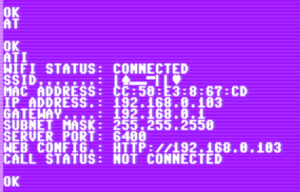
The first thing to try out is an interactive session, here you will type commands and hit enter, then see the results back. Just keep in mind the weird way the Commodore 64/PETSCII deals with upper and lower case.
This upper and lower case confusing will mean you will probably find it easier to set your baud rate to 1200 and set your wifi SSID and password using your computer serial (eg. the Arduino serial monitor, or command line terminal).

at? will list the available commands.

Enter atc1 to connect to Wifi, and ati to get the current WiFi configuration. AT&W will save your settings to the board’s flash memory so you don’t need to enter the WiFi details or baud rate again.
Once we are set up on WiFi, now we can move on to the Commodore 64 (or Vice), and BASIC. This code listing will act similar to typing in the serial monitor or terminal, but now it is all under control of the C64:
1 REM POKE 53272,23
2 PRINT CHR$(5): PRINT CHR$(147): PRINT CHR$(19);
3 OPEN2,2,4,CHR$(8)+CHR$(0):REM OPEN THE SERIAL FROM USER PORT
4 PRINT#2,"ATE0"
5 FOR I = 1 TO 10
6 GET#2,S$
7 PRINT S$;
8 NEXT
9 REM MAIN LOOP
10 GET K$:REM GET FROM C64 KEYBOARD
11 IF K$ = CHR$(13) THEN PRINT#2,CHR$(10)+CHR$(13);
12 IF K$<>"" AND K$ <> CHR$(13) THEN PRINT#2,K$;
13 GET#2,S$: REM GET BYTE FROM SERIAL
14 PRINT S$;:REM PRINT THESE BYTES
15 IF (PEEK(673)AND1)THEN GOTO 15:REM WAIT UNTIL ALL CHARS TRANSMITTED
16 GOTO 10
17 CLOSE 2:END
Once this is running, try getting a web page using atgethttp://example.com/ where example.com is your chosen website.
Getting Web Pages and Webhooks with C64
It won’t take long before you find websites where the URL paths are case sensitive and the weird case stylings of the C64 get annoying, so at that point you might want to store your URLs in BASIC programs and/or variables after converting them to the correct (inverted) case!
Eg. To select the third preset on my RGB LEDs I can use u$="atgethttp://192.168.0.103/WIN&a=64&pl=3"
See full code and WLED API tutorial here.
Sending Messages to Your Phone with Make
I set up a Webhook using the Make service:

The tool is amazing, with lots and lots of integrations, and now I have the C64Wifi firmware able to use SSL you can use the service, except the webhook URLs they give you are case sensitive (lower case), so I had to make my URL string Uppercase!
u$="atgethttps://hook.eu2.make.com/AD3..WJ1?message=c64+basic"
Now I can send messages to my phone from my C64!

Get the Current Time from TimeAPI
There is a nice, free Time API at, appropriately, TIMEAPI.IO with a lot of options. One of the most useful is to get the current time for a given time zone:
u$="atgetHTTPS://TIMEAPI.IO/API/TIMEZONE/ZONE?TIMEZONE=EUROPE/LONDON"
Using this we can get the current time, unfortunately C64 BASIC doesn’t have a way of searching within strings, and the serial connection between the modem and the Commodore 64 userport is unreliable (there is no flow control) so it could take a few attempts to actually get the correct time into our variables.

Here is the important part of the C64 BASIC code, you can get the full program here.
33 REM GET THE URL AND THEN
34 REM PARSE THE RESULT FROM TIMEAPI
35 PRINT#2,U$ + CHR$(10)+CHR$(13);:U$=""
36 PRINT ""
37 IF PEEK(673) AND 1 THEN PRINT ".";: GOTO 37: REM STILL TRANSMITTING
38 REM GET THE TIME
39 CC=0 : REM THE API WILL RETURN MORE CHARS THAT WE CAN USE
40 TS$ = "": NW$=""
41 GET#2,S$:IF S$<>"" AND CC < 255 THEN TS$ = TS$ + S$:CC=CC+1:GOTO 41
42 NW$=MID$(TS$,176,22): TS$=""
43 FOR C = 1 TO LEN(NW$)
44 C$ = MID$(NW$,C,1)
45 IF C$="T" THEN I=C
46 NEXT
47 H$=MID$(NW$,I+1,2)
48 M$=MID$(NW$,I+4,2)
49 S$=MID$(NW$,I+7,2)
50 PRINT ""
51 PRINT H$ + ":" + M$ + ":" + S$
52 PRINT ""
53 IF VAL(H$)<25 AND VAL(M$) < 60 AND VAL(S$)<60 THEN TIME$ = H$ + M$ + S$
54 GET#2,S$:IF S$<>"" THEN GOTO 54
55 FOR W=1 TO 2000: NEXT
56 RETURN
More Fun with APIs
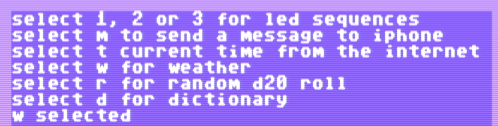
As you can see, there are many, many things you can do once your computer is reading and writing to the web.
- Get the weather in a location using
HTTPS://V2.WTTR.IN/

- Get a random number from random.org (in this case between 1 and 20)
https://www.random.org/INTEGERS/?NUM=1&MIN=1&MAX=20&COL=1&BASE=10&FORMAT=PLAIN&RND=NEW
- Get the definition of a dictionary word using
DICTIONARYAPI.DEV(although it once loaded it seemed to make everything come back garbled on the C64, I think there were characters that upset the Commodore so I updated the C64 WiFi firmware to strip them – I probably still made a mistake somewhere)
rem weather
if i$="w" then print "w selected": u$="atgetHTTPS://V2.WTTR.IN/YORK,UK": gosub transmit

rem random
if i$="r" then print "r selected": u$="atgethttps://www.random.org/INTEGERS/?NUM=1&MIN=1&MAX=20&COL=1&BASE=10&FORMAT=PLAIN&RND=NEW": gosub transmit

rem dictionary
if i$="d" then print "d selected": u$="atgetHTTPS://API.DICTIONARYAPI.DEV/API/V2/ENTRIES/EN/NERD": gosub transmit
Here is the full C64 basic listing.
On the repo I also have it in more readable vs64 format.
1 POKE 53272,23
2 PRINT CHR$(5): PRINT CHR$(147): PRINT CHR$(19);: REM clear screen, white text
3 OPEN2,2,4,CHR$(8)+CHR$(0):REM OPEN THE SERIAL FROM USER PORT
4 PRINT "STARTING"
5 PRINT#2,"AT&K1":GOSUB 25
6 FOR I = 1 TO 5
7 GOSUB 33
8 NEXT
9 GOSUB 91
10 U$="": I$="": GET I$
11 IF I$="1" THEN PRINT "1 SELECTED": U$="ATGETHTTP://192.168.0.103/win&A=64&PL=1": GOSUB 25
12 IF I$="2" THEN PRINT "2 SELECTED": U$="ATGETHTTP://192.168.0.103/win&A=64&PL=2": GOSUB 25
13 IF I$="3" THEN PRINT "3 SELECTED": U$="ATGETHTTP://192.168.0.103/win&A=64&PL=3": GOSUB 25
14 IF I$="M" THEN PRINT "M SELECTED": U$="ATGETHTTPS://HOOK.EU2.MAKE.COM/ad3mie2ehs5uuhjo3n630yut9guhiwj1?MESSAGE=C64+BASIC": GOSUB 25
15 IF I$="T" THEN PRINT "T SELECTED": U$="ATGEThttps://timeapi.io/api/timezone/zone?timezone=europe/london": GOSUB 42
16 IF I$="W" THEN PRINT "W SELECTED": U$="ATGEThttps://v2.wttr.in/york,uk": GOSUB 67
17 IF I$="R" THEN PRINT "R SELECTED": U$="ATGETHTTPS://WWW.RANDOM.ORG/integers/?num=1&min=1&max=20&col=1&base=10&format=plain&rnd=new": GOSUB 25
18 IF I$="D" THEN PRINT "D SELECTED": U$="ATGEThttps://api.dictionaryapi.dev/api/v2/entries/en/nerd": GOSUB 25
19 IF I$ = "" THEN GOTO 10: REM LOOP BACK TO START OF THE MAIN LOOP AGAIN
20 FOR I = 1 TO 5
21 GOSUB 33
22 NEXT
23 GOTO 9
24 CLOSE 2: END
25 PRINT#2,U$ + CHR$(10)+CHR$(13);:U$=""
26 PRINT ""
27 IF PEEK(673) AND 1 THEN PRINT ".";: GOTO 27: REM STILL TRANSMITTING
28 FOR I = 1 TO 5
29 GOSUB 33
30 NEXT
31 RETURN
32 REM GET THE RESPONSE UNTIL NOTHING WAITING
33 S$="":GET#2,S$
34 IF S$="" THEN GOTO 38
35 IF S$=CHR$(13) OR S$=CHR$(10) THEN PRINT S$;:GOTO 33
36 IF S$<" " OR S$>"z" THEN GOTO 33
37 PRINT S$+"";:GOTO 33
38 FOR W=1 TO 400: NEXT
39 RETURN
40 REM GET THE URL AND THEN
41 REM PARSE THE RESULT FROM TIMEAPI
42 PRINT#2,U$ + CHR$(10)+CHR$(13);:U$=""
43 PRINT ""
44 IF PEEK(673) AND 1 THEN PRINT ".";: GOTO 44: REM STILL TRANSMITTING
45 REM GET THE TIME
46 CC=0 : REM THE API WILL RETURN MORE CHARS THAT WE CAN USE
47 TS$ = "": NW$=""
48 GET#2,S$:IF S$<>"" AND CC < 255 THEN TS$ = TS$ + S$:CC=CC+1:GOTO 48
49 NW$=MID$(TS$,176,22): TS$=""
50 FOR C = 1 TO LEN(NW$)
51 C$ = MID$(NW$,C,1)
52 IF C$="T" THEN I=C
53 NEXT
54 H$=MID$(NW$,I+1,2)
55 M$=MID$(NW$,I+4,2)
56 S$=MID$(NW$,I+7,2)
57 PRINT ""
58 PRINT H$ + ":" + M$ + ":" + S$
59 PRINT ""
60 IF VAL(H$)<25 AND VAL(M$) < 60 AND VAL(S$)<60 THEN TIME$ = H$ + M$ + S$
61 GET#2,S$:IF S$<>"" THEN GOTO 61
62 FOR W=1 TO 1000: NEXT
63 RETURN
64 GET#2,S$: IF S$<>"" GOTO 64
65 RETURN
66 REM WEATHER
67 REM GET THE URL AND THEN
68 REM PARSE THE RESULT FROM WEATHER URL
69 GOSUB 64
70 PRINT#2,U$ + CHR$(10)+CHR$(13);:U$=""
71 PRINT ""
72 IF PEEK(673) AND 1 THEN PRINT ".";: GOTO 72: REM STILL TRANSMITTING
73 FOR C=1 TO 1160: GET#2,S$: NEXT
74 REM WEATHER STRING LENGTH ~30
75 WL=50
76 GET#2,S$
77 IF S$ = CHR$(13) OR S$=CHR$(10) AND LEN(W$)
78 IF S$ >= " " AND S$ <= "z" AND LEN(W$)
79 IF LEN(W$)=WL THEN GOTO 83
80 IF S$<>"" GOTO 76
81 GOSUB 64
82 RETURN
83 PRINT CHR$(147)
84 PRINT "CURRENT WEATHER"
85 PRINT W$
86 W$=""
87 PRINT "": PRINT "PRESS A KEY"
88 GET K$: IF K$="" THEN GOTO 88
89 PRINT "PLEASE WAIT ..."
90 GOTO 64
91 PRINT CHR$(5): PRINT CHR$(147): PRINT CHR$(19);: REM clear screen, white text
92 PRINT "SELECT 1, 2 OR 3 FOR LED SEQUENCES"
93 PRINT "SELECT M TO SEND A MESSAGE TO IPHONE"
94 PRINT "SELECT T CURRENT TIME FROM THE INTERNET"
95 PRINT "SELECT W FOR WEATHER"
96 PRINT "SELECT R FOR RANDOM D20 ROLL"
97 PRINT "SELECT D FOR DICTIONARY"
98 RETURN
 C64 BASIC Tutorial: Using String Manipulation to Write a Text Adventure