

What you need
Pimiga runs on a range of Raspberry Pi hardware, so pick the tier that suits your budget. All three work. The product links go to Pimoroni, who are in the UK. If you would rather use Amazon, they carry most of it too, and that link sends you to your own country’s store. Both are affiliate links, so I get a few percent if you use them at no extra cost to you.
The cheapest way in
A Raspberry Pi 4 with 4GB is enough, and if you already have one in a drawer you are done. This is what the original Pimiga builds targeted, along with the Pi 400.
The one I would buy
A Raspberry Pi 5 with 8GB, plus the bits it needs to behave itself:
- Official USB-C power supply. Do not skimp here, most odd Pi behaviour is a power problem.
- Active cooler, because a Pi 5 running an emulator gets warm.
- A case. Plenty of choice, and worth picking one with room for the cooler.
- A micro-HDMI cable, which catches everybody out the first time.
- A microSD card. Get at least 128GB, because the full Pimiga image is not small.
The one that looks right
The Raspberry Pi 500+ is a computer built into a keyboard, the same shape as the machine we are all trying to recreate. There is also the cheaper Pi 500 desktop kit if you want the keyboard form factor without the top-end price. Neither is necessary. Both are lovely.
In this video we look at how to set up your Raspberry Pi (Pi 5, 4, 500/500+ or 400 with PiMiga, the best Amiga experience you can get in 2026. Below you will see the changes to the instructions you need to take a note of for the brand new release.
Previously we looked at the options available for Amiga emulation on the Raspberry Pi but for me this has to be the ultimate Commodore Amiga emulation experience bar none.
Video link: https://youtu.be/4qoefKpHlY4
The latest version is PiMiga 5, a disk image stocked full of software and games, and configured beautifully.
At the time of writing, PiMiga5 has been updated to be compatible with the Raspberry Pi 5/500/500+!
Why PiMiga as your Raspberry Pi Amiga emulator?

There are a few main options for emulating an Amiga on a Raspberry Pi:
- Ambian
- Amiberry
- FS-UAE
- PiMiga
- RetroPie
And since my original articles about this, TheA500 Mini was released, which is wonderful, and I love it for sitting in front of the TV to play games, but for us retro game programming nerds, it is still not quite as good as using a fully-loaded Pi.
The main advantage of PiMiga specifically is you can get a ready setup disk image containing everything you need to get running for both playing games and making them.
Add to that Ethernet and Wifi networking, which is a huge benefit when developing games, but also for getting more games (though the PiMiga collection is extremely extensive).

For many people, the Raspberry Pi was the best Amiga to own in 2020, especially for plugging into a modern TV and for compatibility with game controllers.
Now? I don’t think there can be much argument – this is the best way to experience the Amiga for most people in 2026! I include Mist/MiSTer. That is saying a great deal.
It is absolutely stuffed with games, demos, development tools, music, and it is highly configured to have wonderful, high resolution icons, backdrops, networking, and utilities that make using the Amiga as convenient as running your regular desktop computer.


The Amiga emulation is using the industry-leading UAE, set to be equivalent to a 68060 with 1920 x 1080 screen resolution. You can drop down to other CPUs, and you will need to drop to a 68040 if you want to participate in Marchintosh and use the Apple Macintosh emulation Shapeshifter.
Download PiMiga 5
by Chris Edwards
Pimiga 5 Download Links:
Download Pimiga 5
- PIMIGA5 Raspberry Pi/ARM (32gb zip download)
- PIMIGA5 INTEL (27.8gb 7zip download)
64 gb SD card or larger required
Pimiga 4 Torrent Download Links:
- PIMIGA4-universal CPU 128G – original rpi4/400 +intel NO RPI5
- PIMIGA4-INTEL 64g edition
- PIMIGA4-ARM rpi4/400/5 64g edition
The new PiMiga Torrent means your old torrent downloading software will likely not work. Chris Edwards recommends Qbittorrent: https://www.qbittorrent.org/download
January 2026 NEW PiMiga 5
The Pi 5 version just dropped (links above) and Dr Chris announced this might be the last ever update. Check out Chris Edwards’ channel for more information!
Pimiga Installation Instructions

You might have seen on my Instagram there is a new version of PiMiga, version 4.0 5.0!
These pimiga 5 torrents not only work on Pi 5/500/500+, Pi 4 and Pi400, but also on lots of other computers like Intel and ARM PCs and Macs!
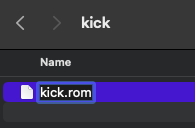
On the SD card will be a folder called Kick, you must copy your Amiga 1200 ROM there and rename it kick.rom, all in lowercase:
If you are like me, you probably have this rom file from Amiga forever or from your $2 Android app but otherwise you can get it from various places on the internet by looking for Amiga Kickstart ROMs.
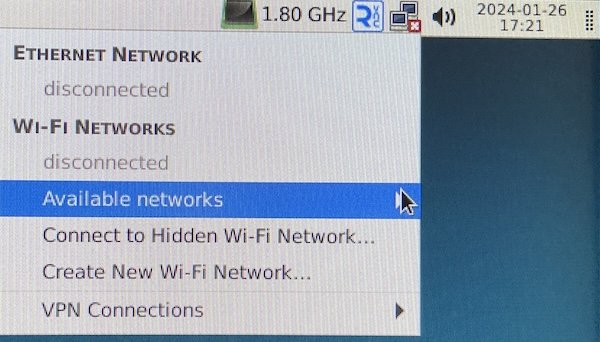
Drop down to the Raspberry Pi operating system using F12 and Quit to set networking and expand your SD card.

If using Raspi-Config to expand the file system on your SD card shows an error like mine did, instead run sudo gparted then click the green arrow, drag to expand the box into the free space, click resize then the green check mark to complete the process.
Not Just Raspberry Pi – Run PiMiga on Your Laptop!
Chris calls Pimiga 5 “The first universal cpu architecture self booting stand alone” and he is not wrong. You can run PiMiga, despite the name, on Intel, AMD or ARM computers of all kinds, so long as it can run Debian 12 (which is a LOT of systems).
 Programming Neo6502 in C/C++ Using CC65